Don't miss your chance to take the Fabric Data Engineer (DP-600) exam for FREE! Find out how by watching the DP-600 session on-demand now through April 28th.
Learn moreJoin the FabCon + SQLCon recap series. Up next: Power BI, Real-Time Intelligence, IQ and AI, and Data Factory take center stage. All sessions are available on-demand after the live show. Register now
I'm trying to create a new table of time intelligence calculations, but it does not seem to be working. I am using the SUMMARIZE function to groupby three different columns and perform the time intelligencence calculations.
If I try something like:
SUMMARIZE(
Table,
'Date'[Date], Table[Category], Table[Subcategory],
"Last Year", CALCULATE(COUNT('Table'[Subcategory]), DATEADD('Date'[Date], -1, YEAR))
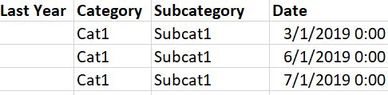
)The groupby works fine, but I do not return any values for my "Last Year" column - my result would look something like:
However, the same time intelligence calculation works perfectly fine as a measure.. just not in this context?
Additionally if I try another expression in place of the time intelligence calculation, I get the result I would expect.
For example, the following works perfectly fine with no blank values:
SUMMARIZE(
Table,
'Date'[Date], Table[Category], Table[Subcategory],
"Last Year", COUNT('Table'[Subcategory])
)I'm not quite sure why this works, but the first one doesn't... especially when the same time intelligence expression works perfectly fine as a stand-alone measure.
Is there anything I can do to modify my expression to get this to work?
@markmess77 - Hmm, yeah, you stray outside the lines with the time "intelligence" functions and things start to break. You may find this helpful - https://community.powerbi.com/t5/Community-Blog/To-bleep-With-Time-Intelligence/ba-p/1260000
Also, see if my Time Intelligence the Hard Way provides a different way of accomplishing what you are going for.
https://community.powerbi.com/t5/Quick-Measures-Gallery/Time-Intelligence-quot-The-Hard-Way-quot-TIT...
@Greg_Deckler That's unfortunate. Wish that these time intelligence functions worked better lol
I had a second approach I had in mind to accomplish what I need. It's not as clean as what I'm trying here, but it should return the same thing.
I'll also give a deeper look into your links, seems interesting!
Thanks!
Check out the April 2026 Power BI update to learn about new features.
If you have recently started exploring Fabric, we'd love to hear how it's going. Your feedback can help with product improvements.
A new Power BI DataViz World Championship is coming this June! Don't miss out on submitting your entry.
| User | Count |
|---|---|
| 45 | |
| 38 | |
| 34 | |
| 21 | |
| 17 |
| User | Count |
|---|---|
| 65 | |
| 63 | |
| 31 | |
| 26 | |
| 25 |