cancel
Showing results for 
Search instead for 
Did you mean: 

The Power BI Data Visualization World Championships is back! Get ahead of the game and start preparing now! Learn more

Reply
markmess77
Resolver I
Resolver I

Unable to use time intelligence function when creating table with DAX?

I'm trying to create a new table of time intelligence calculations, but it does not seem to be working. I am using the SUMMARIZE function to groupby three different columns and perform the time intelligencence calculations.

If I try something like:

SUMMARIZE( 
    Table,
    'Date'[Date], Table[Category], Table[Subcategory],
    "Last Year",  CALCULATE(COUNT('Table'[Subcategory]), DATEADD('Date'[Date], -1, YEAR))
)

 The groupby works fine, but I do not return any values for my "Last Year" column - my result would look something like:
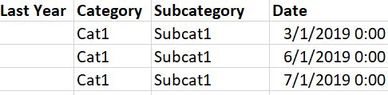
delete.JPG

However, the same time intelligence calculation works perfectly fine as a measure.. just not in this context?

Additionally if I try another expression in place of the time intelligence calculation, I get the result I would expect.

For example, the following works perfectly fine with no blank values:

SUMMARIZE( 
    Table,
    'Date'[Date], Table[Category], Table[Subcategory],
    "Last Year",  COUNT('Table'[Subcategory])
)

I'm not quite sure why this works, but the first one doesn't... especially when the same time intelligence expression works perfectly fine as a stand-alone measure.

Is there anything I can do to modify my expression to get this to work?

2 REPLIES 2
Greg_Deckler
Community Champion
Community Champion

@markmess77 - Hmm, yeah, you stray outside the lines with the time "intelligence" functions and things start to break. You may find this helpful - https://community.powerbi.com/t5/Community-Blog/To-bleep-With-Time-Intelligence/ba-p/1260000

Also, see if my Time Intelligence the Hard Way provides a different way of accomplishing what you are going for.

https://community.powerbi.com/t5/Quick-Measures-Gallery/Time-Intelligence-quot-The-Hard-Way-quot-TIT...


Follow on LinkedIn
@ me in replies or I'll lose your thread!!!
Instead of a Kudo, please vote for this idea
Become an expert!: Enterprise DNA
External Tools: MSHGQM
YouTube Channel!: Microsoft Hates Greg
Latest book!:
DAX For Humans

DAX is easy, CALCULATE makes DAX hard...

@Greg_Deckler That's unfortunate. Wish that these time intelligence functions worked better lol

I had a second approach I had in mind to accomplish what I need. It's not as clean as what I'm trying here, but it should return the same thing.

I'll also give a deeper look into your links, seems interesting!

Thanks!

Helpful resources

Announcements
Power BI DataViz World Championships

Power BI Dataviz World Championships

The Power BI Data Visualization World Championships is back! Get ahead of the game and start preparing now!

December 2025 Power BI Update Carousel

Power BI Monthly Update - December 2025

Check out the December 2025 Power BI Holiday Recap!

FabCon Atlanta 2026 carousel

FabCon Atlanta 2026

Join us at FabCon Atlanta, March 16-20, for the ultimate Fabric, Power BI, AI and SQL community-led event. Save $200 with code FABCOMM.