Join us at FabCon Atlanta from March 16 - 20, 2026, for the ultimate Fabric, Power BI, AI and SQL community-led event. Save $200 with code FABCOMM.
Register now!The Power BI Data Visualization World Championships is back! Get ahead of the game and start preparing now! Learn more
Hi Team,
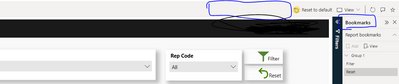
I have an issue showing the Bookmarks option in the action bar in PowerBI services.
I have added the below to the report embed url : &actionBarEnabled=true&bookmarksPaneEnabled=true&personalBookmarksEnabled=true
However, the bookmarks shows on the right hand side instead of showing in the action bar itself. and only "Report bookmark" is visible. but not the "Personal Bookmark" which business is looking for.
Kindly help if i'm missing anything here to make the personal bookmark option available for the users.
Solved! Go to Solution.
Hi @LP280388 ,
According to your statement, I know you want to use personal bookmark in Power BI Embed. Please make sure which kind of Power BI Embed are you using, embed for customer or embed for organiztion.
This feature is disabled by default and is supported only for the embed for your organization (user owns data) solution.
To enable personal bookmarks in embedded reports for your organization:
Verify that your Azure Active Directory (Azure AD) app has the UserState.ReadWrite.All permission.
Set the personalBookmarksEnabled property in the loadConfiguration settings, to true:
let config = {
type: 'report',
...
settings: {
personalBookmarksEnabled: true
}
};
For reference:
Best Regards,
Rico Zhou
If this post helps, then please consider Accept it as the solution to help the other members find it more quickly.
Hi @LP280388 ,
According to your statement, I know you want to use personal bookmark in Power BI Embed. Please make sure which kind of Power BI Embed are you using, embed for customer or embed for organiztion.
This feature is disabled by default and is supported only for the embed for your organization (user owns data) solution.
To enable personal bookmarks in embedded reports for your organization:
Verify that your Azure Active Directory (Azure AD) app has the UserState.ReadWrite.All permission.
Set the personalBookmarksEnabled property in the loadConfiguration settings, to true:
let config = {
type: 'report',
...
settings: {
personalBookmarksEnabled: true
}
};
For reference:
Best Regards,
Rico Zhou
If this post helps, then please consider Accept it as the solution to help the other members find it more quickly.
@Anonymous thank you very much.
Would you mind sharing the steps on where to go and how to do the below:
Verify that your Azure Active Directory (Azure AD) app has the UserState.ReadWrite.All permission.
Set the personalBookmarksEnabled property in the loadConfiguration settings, to true:
Hi I was wondering if you were ever able to find out where to set the UserState.ReadWrite.All permission? I can't seem to find any apps in out Azure AD that control this
The Power BI Data Visualization World Championships is back! Get ahead of the game and start preparing now!
Check out the November 2025 Power BI update to learn about new features.
| User | Count |
|---|---|
| 59 | |
| 46 | |
| 42 | |
| 23 | |
| 18 |
| User | Count |
|---|---|
| 193 | |
| 123 | |
| 99 | |
| 67 | |
| 49 |