
cancel
Showing results for 
Search instead for 
Did you mean: 

July 7 - July 17 | Round 2 of the Power BI Dataviz World Championships. Don't miss your chance! Learn more

Reply
ShrimpCreole
Helper I
Helper I

Unable To Refresh Apps

I am using the desktop version.   My only data source is an Excle file on my hard drive.  


I am publishing fine to workspaces.  The problem isin Apps.  The app will not refresh due to the following error.


Data source error: Scheduled refresh is disabled because at least one data source is missing credentials. To start the refresh again, go to this dataset's settings page and enter credentials for all data sources. Then reactivate scheduled refresh.


I am at a loss where to enter the credentials.  Please help.  

4 REPLIES 4
v-janeyg-msft
Community Support
Community Support

Hi, @ShrimpCreole 


Could you tell me if your problem has been solved? If it is, kindly Accept it as the solution. More people will benefit from it. Or if you are still confused about it, please provide me with more details about your table and your problem or share me with your pbix file after removing sensitive data.


Best Regards,
Community Support Team _ Janey

Anonymous
Not applicable

Hi @ShrimpCreole 

If you have your datasource on hard drive then you will not be able to schedule a refresh without On-Premise gateway. You will have to refresh it on desktop and upload everyday.


The other option will be to create a file on sharepoint and then schedule refresh.


Hi Pranit828.  I have the file open on the desktop.  I refresh the Power Bi.  I then publish my changes.   The changes are reflected in the workplaces.  However, the app does not refresh, due to the above data source error?

Hi, @ShrimpCreole 


vjaneygmsft_0-1639987761352.png

What does 'app doesn't refresh' mean? Can you show the screenshot of error meassage?

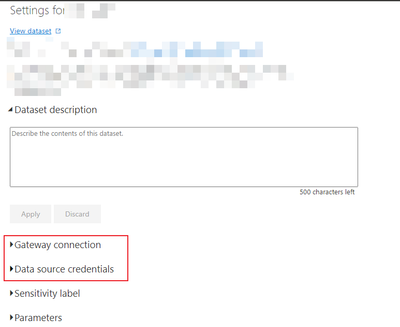
Are you sure that there are no other data sources in the dataset that require adding credentials? Check if you need to update your credentials or use a gateway in dataset setting.

vjaneygmsft_1-1639987927389.png

vjaneygmsft_2-1639988038242.png

You can also try to update app in workapace to see if it has issues.

vjaneygmsft_3-1639988091464.png

Did I answer your question ? Please mark my reply as solution. Thank you very much.
If not, please feel free to ask me.


Best Regards,
Community Support Team _ Janey

Helpful resources

Announcements
FabCon and SQLCon Barcelona 2026

FabCon & SQLCon – Barcelona 2026

Join us in Barcelona for FabCon and SQLCon, the Fabric, Power BI, SQL, and AI community event. Save €200 with code FABCMTY200.

60 days of Data Days Carousel

Data Days 2026

Join Data Days 2026: 60 days of free live/on-demand sessions, challenges, study groups, and certification opportunities.

Power BI DataViz World Championships carousel

Power BI DataViz World Championships - June 2026

A new Power BI DataViz World Championship is coming this June! Don't miss out on submitting your entry.

Top Solution Authors