Get certified for free when you join Fabric Data Days 2026 and dive into Fabric, Power BI, SQL, AI, and other essential data skills.
Join nowJuly 7 - July 17 | Round 2 of the Power BI Dataviz World Championships. Don't miss your chance! Learn more
Hello experts, How to get the down table from the above one in the image, please?
Solved! Go to Solution.
Hi.
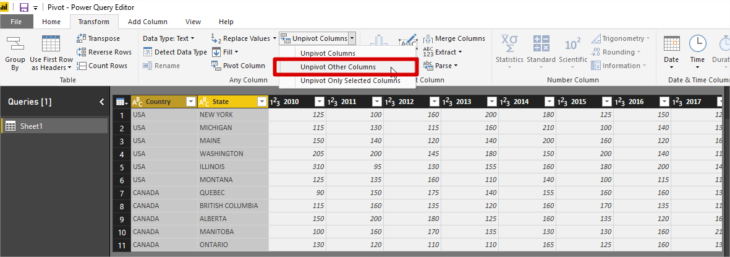
In Power query select your first column and choose the option Unpivot Other Columns
Best regards.
Hi @koorosh ,
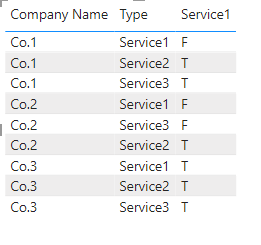
As they said, you could use unpivot in power query; and another method is to create a new table through the following form:
Newtable =
VAR _new1 =
SUMMARIZE ( 'Table', [Company Name], [Service1], "Type", "Service1" )
VAR _new2 =
SUMMARIZE ( 'Table', [Company Name], [Service2], "Type", "Service2" )
VAR _new3 =
SUMMARIZE ( 'Table', [Company Name], [Service3], "Type", "Service3" )
RETURN
UNION ( _new1, _new2, _new3 )
The final output is shown below:
Best Regards,
Community Support Team_ Yalan Wu
If this post helps, then please consider Accept it as the solution to help the other members find it more quickly.
Hi @koorosh
I tried the following solution.
First, you need to select the columns and then unpivot them(refer to screenshot 1).
Screenshot 1:
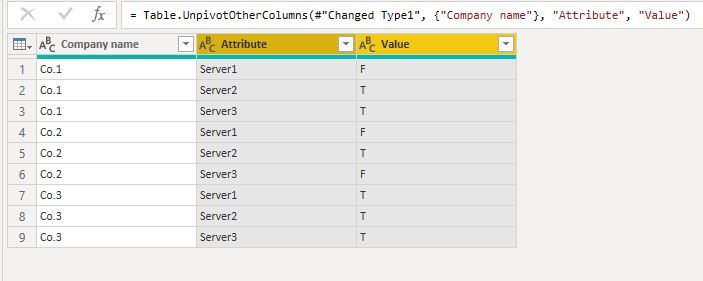
Which will give you the following output(refer to screenshot 2):
Screenshot 2:
If you find the solution useful please mark my post as a solution!
In doing so, you are also helping me. Thank you!
Mintu Baruah
Hi.
In Power query select your first column and choose the option Unpivot Other Columns
Best regards.
Join us in Barcelona for FabCon and SQLCon, the Fabric, Power BI, SQL, and AI community event. Save €200 with code FABCMTY200.
Join Fabric Data Days 2026: 60 days of free live/on-demand sessions, challenges, study groups, and certification opportunities.
| User | Count |
|---|---|
| 23 | |
| 23 | |
| 17 | |
| 13 | |
| 13 |
| User | Count |
|---|---|
| 63 | |
| 41 | |
| 39 | |
| 38 | |
| 38 |