Share feedback directly with Fabric product managers, participate in targeted research studies and influence the Fabric roadmap.
Sign up nowGet Fabric certified for FREE! Don't miss your chance! Learn more
Hello experts, How to get the down table from the above one in the image, please?
Solved! Go to Solution.
Hi.
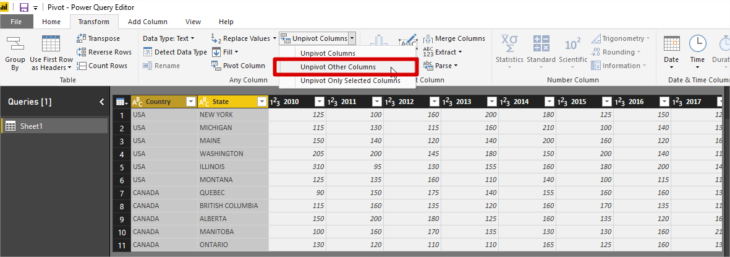
In Power query select your first column and choose the option Unpivot Other Columns
Best regards.
Hi @koorosh ,
As they said, you could use unpivot in power query; and another method is to create a new table through the following form:
Newtable =
VAR _new1 =
SUMMARIZE ( 'Table', [Company Name], [Service1], "Type", "Service1" )
VAR _new2 =
SUMMARIZE ( 'Table', [Company Name], [Service2], "Type", "Service2" )
VAR _new3 =
SUMMARIZE ( 'Table', [Company Name], [Service3], "Type", "Service3" )
RETURN
UNION ( _new1, _new2, _new3 )
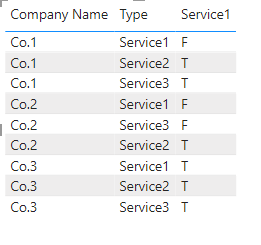
The final output is shown below:
Best Regards,
Community Support Team_ Yalan Wu
If this post helps, then please consider Accept it as the solution to help the other members find it more quickly.
Hi @koorosh
I tried the following solution.
First, you need to select the columns and then unpivot them(refer to screenshot 1).
Screenshot 1:
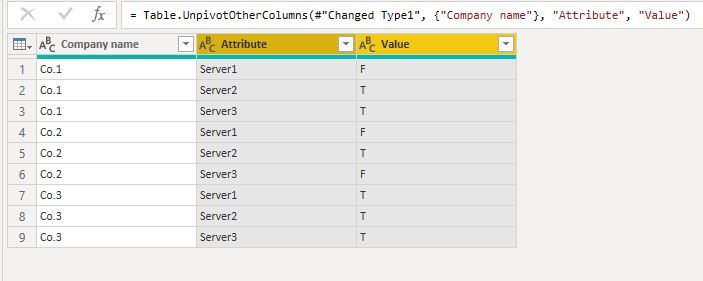
Which will give you the following output(refer to screenshot 2):
Screenshot 2:
If you find the solution useful please mark my post as a solution!
In doing so, you are also helping me. Thank you!
Mintu Baruah
Hi.
In Power query select your first column and choose the option Unpivot Other Columns
Best regards.
If you love stickers, then you will definitely want to check out our Community Sticker Challenge!
Check out the January 2026 Power BI update to learn about new features.
| User | Count |
|---|---|
| 62 | |
| 58 | |
| 45 | |
| 21 | |
| 18 |
| User | Count |
|---|---|
| 121 | |
| 116 | |
| 37 | |
| 34 | |
| 30 |