cancel
Showing results for 
Search instead for 
Did you mean: 

The Power BI Data Visualization World Championships is back! Get ahead of the game and start preparing now! Learn more

Reply
st-mb
Frequent Visitor

Tracking role changes (LOOKUPVALUE?)

Hello,


I'm trying to create a report that tracks employees' tasks they've completed and the role they completed it as.


For example, all employees have a role at the beginning of this year, but some may be promoted. These changes are tracked in the Employees table:


UserID	Name	        Role	        Date
1	EmployeeA	Support	        1/1/2018
2	EmployeeB	Support	        1/1/2018
3	EmployeeC	Support	        1/1/2018
4	EmployeeD	Support	        1/1/2018
5	EmployeeE	Senior Support	1/1/2018
3	EmployeeC	Senior Support	3/18/2018
5	EmployeeE	Supervisor	6/4/2018

The tasks they've completed over the year so far are in the Tasks table:


TaskName	Date	        UserID
Task A	        2/1/2018	2
Task B	        2/1/2018	1
Task C	        3/1/2018	3
Task D	        3/25/2018	3
Task E	        5/5/2018	4
Task F	        6/3/2018	5
Task G	        6/4/2018	5

What I was thinking the output would be is similar to this:


TaskName	Date	          UserID   Role
Task A	        2/1/2018	  2	   Support
Task B	        2/1/2018	  1	   Support
Task C	        3/1/2018	  3	   Support
Task D	        3/25/2018         3	   Senior Support
Task E	        5/5/2018	  4	   Support
Task F	        6/3/2018	  5	   Senior Support
Task G	        6/4/2018	  5	   Supervisor

I can sort of achieve this with LOOKUPVALUE and UserID, but I'm having difficulties adding the date part (unless there's a more efficient way to go about doing this?).


Thanks in advance!

1 ACCEPTED SOLUTION
Ashish_Mathur
Super User
Super User

Hi,


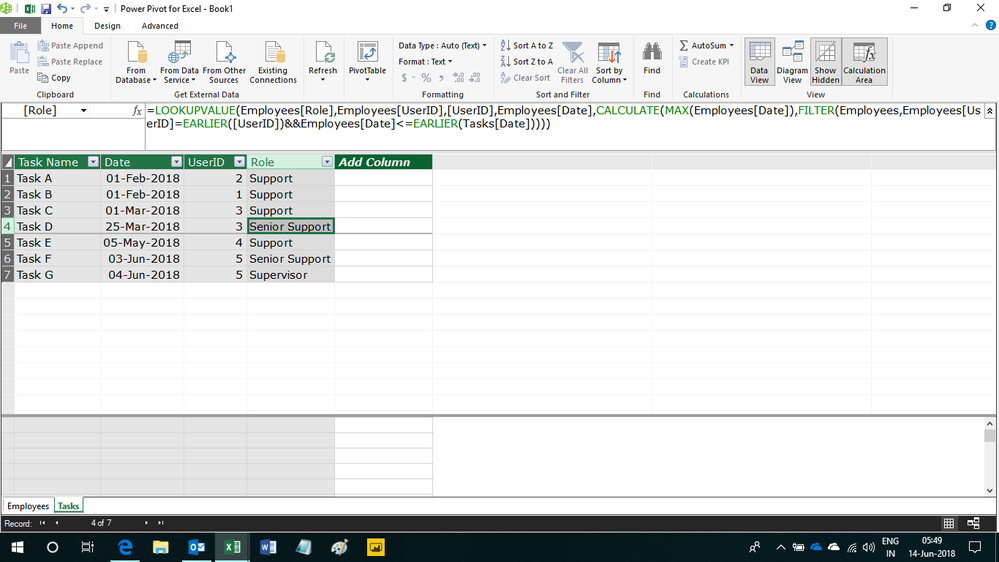
Write this calculated column formula


=LOOKUPVALUE(Employees[Role],Employees[UserID],[UserID],Employees[Date],CALCULATE(MAX(Employees[Date]),FILTER(Employees,Employees[UserID]=EARLIER([UserID])&&Employees[Date]<=EARLIER(Tasks[Date]))))


Hope this helps.


Untitled.png


Regards,
Ashish Mathur
http://www.ashishmathur.com
https://www.linkedin.com/in/excelenthusiasts/

View solution in original post

3 REPLIES 3
Ashish_Mathur
Super User
Super User

Hi,


Write this calculated column formula


=LOOKUPVALUE(Employees[Role],Employees[UserID],[UserID],Employees[Date],CALCULATE(MAX(Employees[Date]),FILTER(Employees,Employees[UserID]=EARLIER([UserID])&&Employees[Date]<=EARLIER(Tasks[Date]))))


Hope this helps.


Untitled.png


Regards,
Ashish Mathur
http://www.ashishmathur.com
https://www.linkedin.com/in/excelenthusiasts/

Thank you both! I used Ashish_Mathur's suggested formula and it worked perfectly.

Anonymous
Not applicable

Hey @st-mb


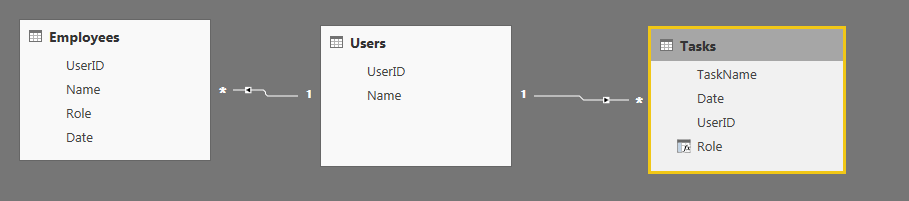
A couple of steps to calculate this. First, I create a table of unique UserID's to connect the Employees and Tasks table.


Pic1.PNG


Then you can calculate the new role column with the following formula:


Role = 
VAR CurrentUser = FIRSTNONBLANK(Tasks[UserID],1)
RETURN
CALCULATE(
    FIRSTNONBLANK(Employees[Role],1),
    TOPN(
        1,
        FILTER(
            Employees,
            Employees[UserID] = CurrentUser && Tasks[Date] >= Employees[Date]
        ),
        Employees[Date]
    )
)

This gives you the desired output, shown below:


Pic2.PNG


Let me know if you have any questions on the formula.


Hope this helps!

Parker

Helpful resources

Announcements
Power BI DataViz World Championships

Power BI Dataviz World Championships

The Power BI Data Visualization World Championships is back! Get ahead of the game and start preparing now!

December 2025 Power BI Update Carousel

Power BI Monthly Update - December 2025

Check out the December 2025 Power BI Holiday Recap!

FabCon Atlanta 2026 carousel

FabCon Atlanta 2026

Join us at FabCon Atlanta, March 16-20, for the ultimate Fabric, Power BI, AI and SQL community-led event. Save $200 with code FABCOMM.