Join us at FabCon Atlanta from March 16 - 20, 2026, for the ultimate Fabric, Power BI, AI and SQL community-led event. Save $200 with code FABCOMM.
Register now!The Power BI Data Visualization World Championships is back! Get ahead of the game and start preparing now! Learn more
Hi
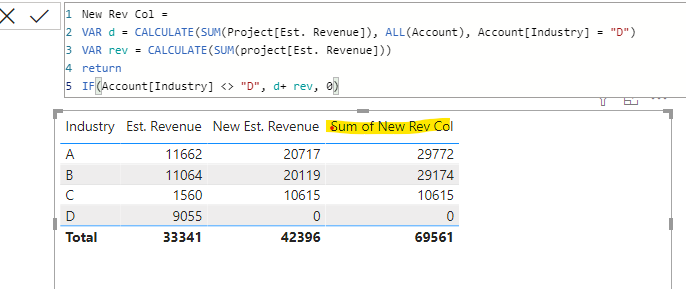
I created a new measure for Est. Revenue which works fine in the rows, but the Total shows the incorrect value.
In this case I tried with SUMX, but it doesn't work either.
Thank you.
Hi, @thhmez7
Please check if these thread can be helpful.
https://community.powerbi.com/t5/Desktop/Incorrect-Measure-Total/m-p/454679#M210659
Try to wrap a SUMMARIZE function within the SUMX function.
If it doesn't work ,please share a sample file for further research.
Best Regards,
Community Support Team _ Eason
Try:
With totals =
SUMX ( VALUES ( Account[Industry] ), [Est. Revenue] )
Proud to be a Super User!
Paul on Linkedin.
Hi @thhmez7
I created a column instead of a measure with DAX code below, then I added this column to the chart and total was 51451
VAR D=CALCULATE(SUM(Table[Revenue]),ALL(Table),Table[Industry]="D")
VAR C=Table[Revenue]
Return IF(Table[Industry]<>"D",D+C,0)
Did it work ? 👌 Mark it as a solution to help spreading knowledge 👍 A kudos would be appreciated
Hi
do you use SUM of the revenue in VAR C?
It hasn't worked for me with the column.
@thhmez7 Var rev=Project[Est. Revenue]
Did it work ? 👌 Mark it as a solution to help spreading knowledge 👉 A kudos would be appreciated
No that expression in VAR rev is not allowed 😞
@thhmez7 , if D selected is not selected slicer you can create you measure like
calculate(sum(project[est revenue]), filter(account,account[industry] <> "D")) +0
The Power BI Data Visualization World Championships is back! Get ahead of the game and start preparing now!
Check out the November 2025 Power BI update to learn about new features.
| User | Count |
|---|---|
| 59 | |
| 43 | |
| 42 | |
| 23 | |
| 17 |
| User | Count |
|---|---|
| 190 | |
| 122 | |
| 96 | |
| 66 | |
| 47 |