Join us at FabCon Atlanta from March 16 - 20, 2026, for the ultimate Fabric, Power BI, AI and SQL community-led event. Save $200 with code FABCOMM.
Register now!The Power BI Data Visualization World Championships is back! Get ahead of the game and start preparing now! Learn more
Hi
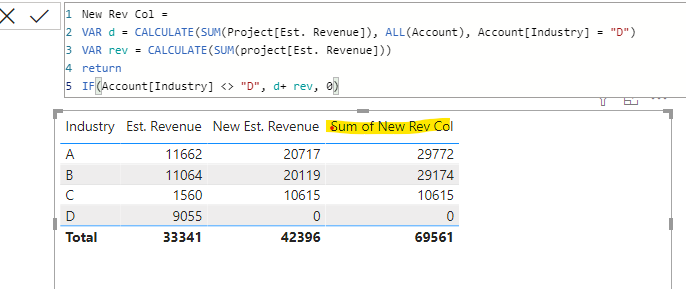
I created a new measure for Est. Revenue which works fine in the rows, but the Total shows the incorrect value.
In this case I tried with SUMX, but it doesn't work either.
Thank you.
Hi, @thhmez7
Please check if these thread can be helpful.
https://community.powerbi.com/t5/Desktop/Incorrect-Measure-Total/m-p/454679#M210659
Try to wrap a SUMMARIZE function within the SUMX function.
If it doesn't work ,please share a sample file for further research.
Best Regards,
Community Support Team _ Eason
Try:
With totals =
SUMX ( VALUES ( Account[Industry] ), [Est. Revenue] )
Proud to be a Super User!
Paul on Linkedin.
Hi @thhmez7
I created a column instead of a measure with DAX code below, then I added this column to the chart and total was 51451
VAR D=CALCULATE(SUM(Table[Revenue]),ALL(Table),Table[Industry]="D")
VAR C=Table[Revenue]
Return IF(Table[Industry]<>"D",D+C,0)
Did it work ? 👌 Mark it as a solution to help spreading knowledge 👍 A kudos would be appreciated
Hi
do you use SUM of the revenue in VAR C?
It hasn't worked for me with the column.
@thhmez7 Var rev=Project[Est. Revenue]
Did it work ? 👌 Mark it as a solution to help spreading knowledge 👉 A kudos would be appreciated
No that expression in VAR rev is not allowed 😞
@thhmez7 , if D selected is not selected slicer you can create you measure like
calculate(sum(project[est revenue]), filter(account,account[industry] <> "D")) +0
The Power BI Data Visualization World Championships is back! Get ahead of the game and start preparing now!
| User | Count |
|---|---|
| 41 | |
| 38 | |
| 36 | |
| 30 | |
| 28 |
| User | Count |
|---|---|
| 128 | |
| 88 | |
| 79 | |
| 67 | |
| 62 |