
cancel
Showing results for 
Search instead for 
Did you mean: 

Learn from the best! Meet the four finalists headed to the FINALS of the Power BI Dataviz World Championships! Register now

Reply
bhmiller89
Helper V
Helper V

TopN

 I have a table SalesOpportunities that lists various information including "RecurringServices$," "Project$," and "Product$"


I want to calculate/show the Top 10 Sales Opportunities for 1. The highest Product$ 2. The highest RecurringServices$ and 3. The highest Project$

1 ACCEPTED SOLUTION
Anonymous
Not applicable

Hi bhmiller89,


>> and I get the error "The expression refers to multiple columns. Multiple columns cannot be converted to a scalar value."


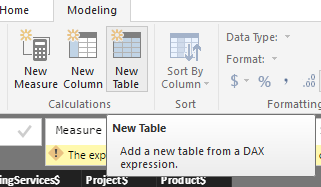
I think you put this dax formula to a measure, you should use a table to receive the new table from the topn function:


Capture6.PNG


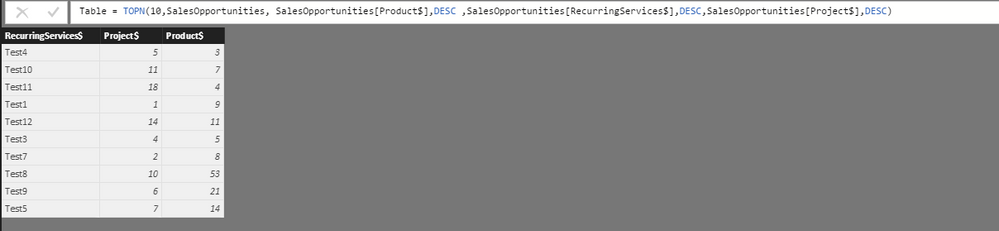
TopN function: Returns the top N rows of the specified table.


Capture7.PNG


Capture8.PNG


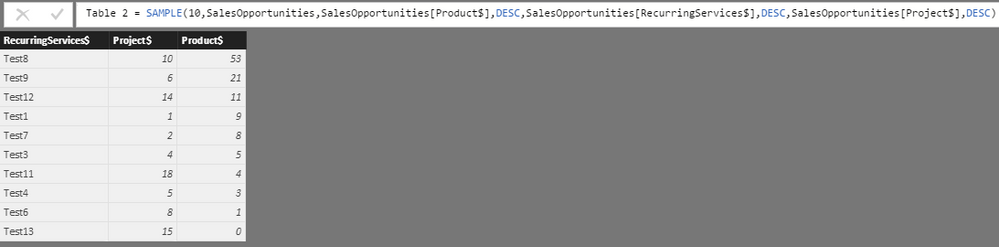
The order by columns of topN function seems not work, perhaps you could try to use ‘sample function’:


Capture9.PNG


Regards,

Xiaoxin Sheng

View solution in original post

5 REPLIES 5
BhaveshPatel
Super User
Super User

You can write a DAX Query as below:


and modify further as per your needs.


EVALUATE


 TOPN(

        10,

       SalesOpportunities,

       SalesOpportunities[Product$],

       SalesOpportunities[RecurringServices$],

       SalesOpportunities[Project$]

)


Hope this would solve your problem.

Thanks & Regards,
Bhavesh

Love the Self Service BI.
Please use the 'Mark as answer' link to mark a post that answers your question. If you find a reply helpful, please remember to give Kudos.

Hi,


I wrote


TopOpps= TOPN(10, 'Sales Opportunities', 'Sales Opportunities[Product$], DESC, 'Sales Opportunities[Project$], DESC, 'Sales Opportunities[Recurring$], DESC)


and I get the error "The expression refers to multiple columns. Multiple columns cannot be converted to a scalar value."

Anonymous
Not applicable

Hi bhmiller89,


>> and I get the error "The expression refers to multiple columns. Multiple columns cannot be converted to a scalar value."


I think you put this dax formula to a measure, you should use a table to receive the new table from the topn function:


Capture6.PNG


TopN function: Returns the top N rows of the specified table.


Capture7.PNG


Capture8.PNG


The order by columns of topN function seems not work, perhaps you could try to use ‘sample function’:


Capture9.PNG


Regards,

Xiaoxin Sheng

You need to use the DAX Studio to get the query results as it is referring to the multiple columns. 


downloading is at 


https://www.sqlbi.com/tools/dax-studio/


use EVALUATE 


     QUERY SYNTAX


Thanks & Regards,
Bhavesh

Love the Self Service BI.
Please use the 'Mark as answer' link to mark a post that answers your question. If you find a reply helpful, please remember to give Kudos.

TopOpps= CALCULATE([expression],TOPN(10, 'Sales Opportunities', 'Sales Opportunities[Product$], DESC, 'Sales Opportunities[Project$], DESC, 'Sales Opportunities[Recurring$], DESC)

Thanks & Regards,
Bhavesh

Love the Self Service BI.
Please use the 'Mark as answer' link to mark a post that answers your question. If you find a reply helpful, please remember to give Kudos.

Helpful resources

Announcements
Join our Fabric User Panel

Join our Fabric User Panel

Share feedback directly with Fabric product managers, participate in targeted research studies and influence the Fabric roadmap.

March Power BI Update Carousel

Power BI Community Update - March 2026

Check out the March 2026 Power BI update to learn about new features.