This time we’re going bigger than ever. Fabric, Power BI, SQL, AI and more. We're covering it all. You won't want to miss it.
Learn moreDid you hear? There's a new SQL AI Developer certification (DP-800). Start preparing now and be one of the first to get certified. Register now
Hello,
I'm trying to rank locations based on a dynamic Top N filter using parameters. It seems to work if I have only loc2_name in my table view but when I add the location&state field as well to the view the ranks are shown as 1 . Can anyone help me on what I'm missing here.
Solved! Go to Solution.
Hi @DPJay
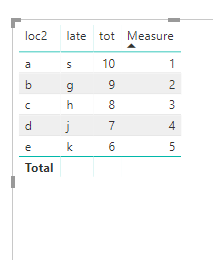
As tested, when all columns added to the Table visual is set as "don't summarize", create a measure as below may works
Note: compare with yours, please pay attention to the bold character.
Measure = IF(HASONEVALUE(Table1[late]), RANKX(ALL(Table1),[value],,DESC))
Best Regards
Maggie
Hi @DPJay
As tested, when all columns added to the Table visual is set as "don't summarize", create a measure as below may works
Note: compare with yours, please pay attention to the bold character.
Measure = IF(HASONEVALUE(Table1[late]), RANKX(ALL(Table1),[value],,DESC))
Best Regards
Maggie
Hello,
Rank Measure = IF ( HASONEVALUE ( FINAL_TBL[location&state] ), RANKX ( ALL (FINAL_TBL[location&state]), [TOT_QTY] ) )
Check out the April 2026 Power BI update to learn about new features.
If you have recently started exploring Fabric, we'd love to hear how it's going. Your feedback can help with product improvements.
A new Power BI DataViz World Championship is coming this June! Don't miss out on submitting your entry.
| User | Count |
|---|---|
| 38 | |
| 38 | |
| 31 | |
| 22 | |
| 15 |
| User | Count |
|---|---|
| 74 | |
| 61 | |
| 31 | |
| 31 | |
| 23 |