Join us at FabCon Atlanta from March 16 - 20, 2026, for the ultimate Fabric, Power BI, AI and SQL community-led event. Save $200 with code FABCOMM.
Register now!The Power BI Data Visualization World Championships is back! It's time to submit your entry. Live now!
Hello,
I'm trying to rank locations based on a dynamic Top N filter using parameters. It seems to work if I have only loc2_name in my table view but when I add the location&state field as well to the view the ranks are shown as 1 . Can anyone help me on what I'm missing here.
Solved! Go to Solution.
Hi @DPJay
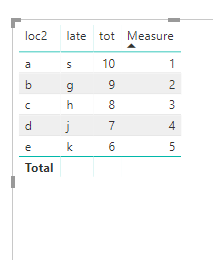
As tested, when all columns added to the Table visual is set as "don't summarize", create a measure as below may works
Note: compare with yours, please pay attention to the bold character.
Measure = IF(HASONEVALUE(Table1[late]), RANKX(ALL(Table1),[value],,DESC))
Best Regards
Maggie
Hi @DPJay
As tested, when all columns added to the Table visual is set as "don't summarize", create a measure as below may works
Note: compare with yours, please pay attention to the bold character.
Measure = IF(HASONEVALUE(Table1[late]), RANKX(ALL(Table1),[value],,DESC))
Best Regards
Maggie
Hello,
Rank Measure = IF ( HASONEVALUE ( FINAL_TBL[location&state] ), RANKX ( ALL (FINAL_TBL[location&state]), [TOT_QTY] ) )
The Power BI Data Visualization World Championships is back! It's time to submit your entry.
Check out the January 2026 Power BI update to learn about new features.
| User | Count |
|---|---|
| 56 | |
| 42 | |
| 40 | |
| 21 | |
| 20 |
| User | Count |
|---|---|
| 150 | |
| 105 | |
| 63 | |
| 36 | |
| 36 |