This is best Fabric, Power BI, SQL and AI community event. How do we know? The last event sold out! Save €200 with code FABCMTY200.
Register nowThe Fabric community is upgrading! Read all of the details including the timeline and what you can expect. Learn more
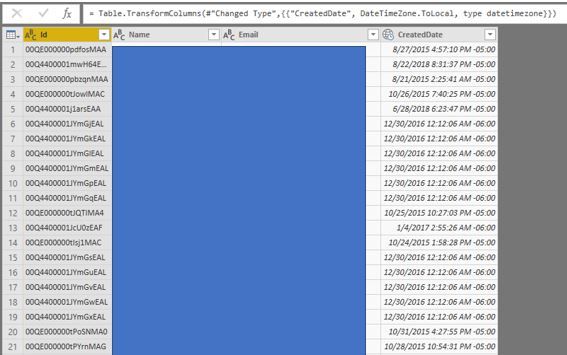
Need some help determining how to adjust my timezone with power query, I have found instructions on this forum however this is not working. I have changed my date type to Date/Time/TimeZone then gone to Transform and adjusted timezone to local. This is not updating the time, however.
Hi @aaron1225
The datetime column in your file doesn't fit the local time zone, right?
If so,
To see you local timezone, use power query function:
DateTimeZone.LocalNow()
To change timezone, use power query function:
= DateTimeZone.SwitchZone(dateTimeZone, timezoneHours , timezoneMinutes )
In addtion, please refer to:
http://radacad.com/solving-dax-time-zone-issue-in-power-bi
https://msdn.microsoft.com/en-us/query-bi/m/datetimezone-functions
Best Regards
Maggie
Community Support Team _ Maggie Li
If this post helps, then please consider Accept it as the solution to help the other members find it more quickly.
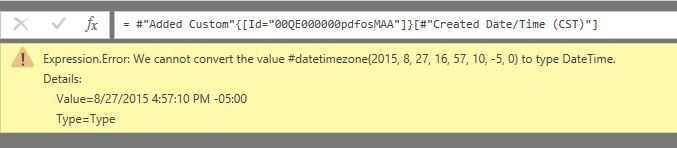
@v-juanli-msft thank you, I referenced the blog post and found this too https://www.excelguru.ca/blog/2015/05/20/data-from-different-timezones/ however I am now getting an error using the below, I get and Expression.Error:
let
Source = Salesforce.Data("https://xxxxxxxxxxxx.my.salesforce.com"),
Lead1 = Source{[Name="Lead"]}[Data],
#"Removed Other Columns" = Table.SelectColumns(Lead1,{"Id", "Name", "Email", "CreatedDate"}),
#"Changed Type" = Table.TransformColumnTypes(#"Removed Other Columns",{{"CreatedDate", type datetimezone}}),
#"Added Custom" = Table.AddColumn(#"Changed Type", "Created Date/Time (CST)", each DateTimeZone.ToLocal(DateTime.AddZone([CreatedDate],0)))
in
#"Added Custom"
Hi @aaron1225
It should be possible to fix the timezone issue, but i'm confuzed by your expected result.
If "created date"=2015/8/27 4:47:10 PM -05:00,
What's result do you want by your formula
"#"Added Custom" = Table.AddColumn(#"Changed Type", "Created Date/Time (CST)", each DateTimeZone.ToLocal(DateTime.AddZone([CreatedDate],0)))" ?
Best Regards
Maggie
Join us in Barcelona for FabCon and SQLCon, the Fabric, Power BI, SQL, and AI community event. Save €200 with code FABCMTY200.
| User | Count |
|---|---|
| 24 | |
| 22 | |
| 20 | |
| 18 | |
| 14 |
| User | Count |
|---|---|
| 32 | |
| 26 | |
| 23 | |
| 20 | |
| 20 |