This time we’re going bigger than ever. Fabric, Power BI, SQL, AI and more. We're covering it all. You won't want to miss it.
Learn moreDid you hear? There's a new SQL AI Developer certification (DP-800). Start preparing now and be one of the first to get certified. Register now
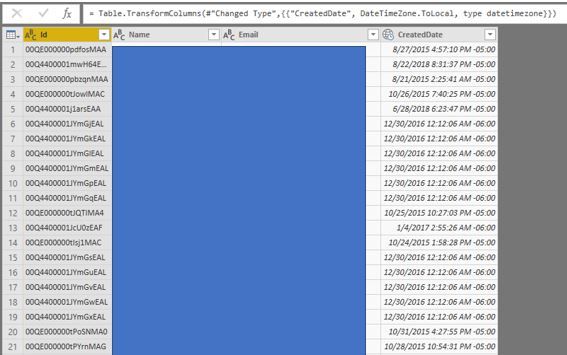
Need some help determining how to adjust my timezone with power query, I have found instructions on this forum however this is not working. I have changed my date type to Date/Time/TimeZone then gone to Transform and adjusted timezone to local. This is not updating the time, however.
Hi @aaron1225
The datetime column in your file doesn't fit the local time zone, right?
If so,
To see you local timezone, use power query function:
DateTimeZone.LocalNow()
To change timezone, use power query function:
= DateTimeZone.SwitchZone(dateTimeZone, timezoneHours , timezoneMinutes )
In addtion, please refer to:
http://radacad.com/solving-dax-time-zone-issue-in-power-bi
https://msdn.microsoft.com/en-us/query-bi/m/datetimezone-functions
Best Regards
Maggie
Community Support Team _ Maggie Li
If this post helps, then please consider Accept it as the solution to help the other members find it more quickly.
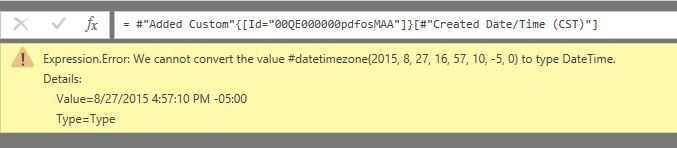
@v-juanli-msft thank you, I referenced the blog post and found this too https://www.excelguru.ca/blog/2015/05/20/data-from-different-timezones/ however I am now getting an error using the below, I get and Expression.Error:
let
Source = Salesforce.Data("https://xxxxxxxxxxxx.my.salesforce.com"),
Lead1 = Source{[Name="Lead"]}[Data],
#"Removed Other Columns" = Table.SelectColumns(Lead1,{"Id", "Name", "Email", "CreatedDate"}),
#"Changed Type" = Table.TransformColumnTypes(#"Removed Other Columns",{{"CreatedDate", type datetimezone}}),
#"Added Custom" = Table.AddColumn(#"Changed Type", "Created Date/Time (CST)", each DateTimeZone.ToLocal(DateTime.AddZone([CreatedDate],0)))
in
#"Added Custom"
Hi @aaron1225
It should be possible to fix the timezone issue, but i'm confuzed by your expected result.
If "created date"=2015/8/27 4:47:10 PM -05:00,
What's result do you want by your formula
"#"Added Custom" = Table.AddColumn(#"Changed Type", "Created Date/Time (CST)", each DateTimeZone.ToLocal(DateTime.AddZone([CreatedDate],0)))" ?
Best Regards
Maggie
Check out the April 2026 Power BI update to learn about new features.
Sign up to receive a private message when registration opens and key events begin.
If you have recently started exploring Fabric, we'd love to hear how it's going. Your feedback can help with product improvements.
| User | Count |
|---|---|
| 34 | |
| 31 | |
| 30 | |
| 21 | |
| 16 |
| User | Count |
|---|---|
| 62 | |
| 51 | |
| 31 | |
| 23 | |
| 23 |