Get certified for free when you join Fabric Data Days 2026 and dive into Fabric, Power BI, SQL, AI, and other essential data skills.
Join nowJuly 7 - July 17 | Round 2 of the Power BI Dataviz World Championships. Don't miss your chance! Learn more
Hi Everyone!
I´m trying to show a measure of acumulative time in a Pie Chart.
But there is some problem and I can't.
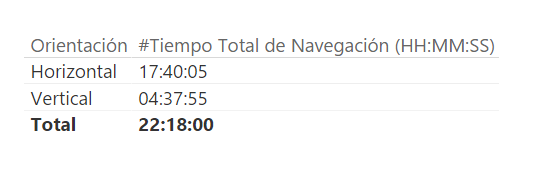
I have the measure "#Tiempo Total de Navegación (HH:mm:ss)" like this:
Some clue?
Solved! Go to Solution.
@Anonymous
It is not possible to do it currently. You can submit your requirement on Power BI Ideas.![]()
Regards
@Anonymous
I´m trying to show a measure of acumulative time in a Pie Chart.
But there is some problem and I can't.
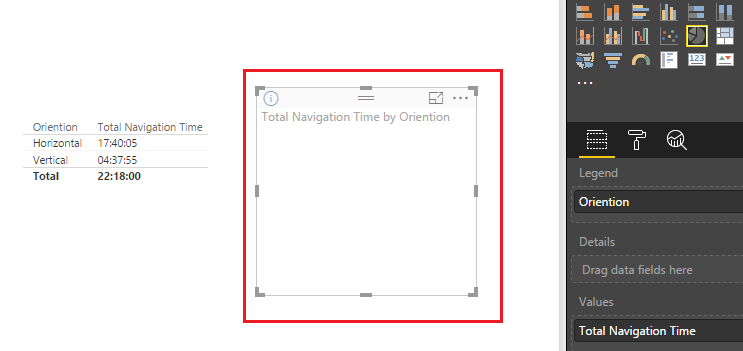
So what is the problem? Could you be more precisely with it? Is that the Pie Chart doesn't show any data in report like below?
If that is the case, I would suggest you to change the measure "Total Navigation Time" to calculate the accumulative time in seconds, or in minutes/hours with a numeric type instead of time type(HH: MM: SS). Because the Values of Pie Chart doesn't support time type data, so it won't display anything. See my sample below.
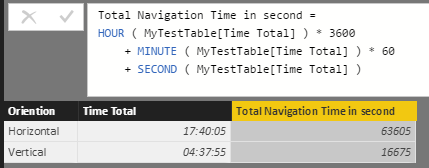
To make it simple, I just assume you have a table called MyTestTable like below.
Use formula below to create the measure "Total Navigation Time" to calculate the accumulative time in seconds.
Total Navigation Time in second =
HOUR ( MyTestTable[Time Total] ) * 3600
+ MINUTE ( MyTestTable[Time Total] ) * 60
+ SECOND ( MyTestTable[Time Total] )Then show the measure in a Pie Chart in report.
Regards
Hi @v-ljerr-msft !
Thanks for the answer.
That is my problem and that is the solution that I used.
But I would like to know if It was possible to put the datas in the pie chart as date/time like hh:mm:ss.
@Anonymous
It is not possible to do it currently. You can submit your requirement on Power BI Ideas.![]()
Regards
Join us in Barcelona for FabCon and SQLCon, the Fabric, Power BI, SQL, and AI community event. Save €200 with code FABCMTY200.
Join Data Days 2026: 60 days of free live/on-demand sessions, challenges, study groups, and certification opportunities.
| User | Count |
|---|---|
| 26 | |
| 23 | |
| 19 | |
| 18 | |
| 15 |
| User | Count |
|---|---|
| 47 | |
| 44 | |
| 43 | |
| 35 | |
| 30 |