
This is best Fabric, Power BI, SQL and AI community event. How do we know? The last event sold out! Save €200 with code FABCMTY200.
Register nowA new Data Days event is coming soon! This time we’re going bigger than ever. Fabric, Power BI, SQL, AI and more. Don't miss out.
hi
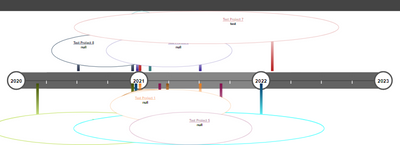
I tried few visual but am not getting desired time line visuals.
i tried Gantt chart xViz,as Time line,Time line circle all from power bi visual stores.
Closest i got with Time line circle but not many options for formating.
Are they any time line visual,which can show bit neat and easy to understand.
Is there any way to remove or format those circle.below chart is "time line circle".
Sample data in excel.
Thanks
Solved! Go to Solution.
Hi @bideveloper555 ,
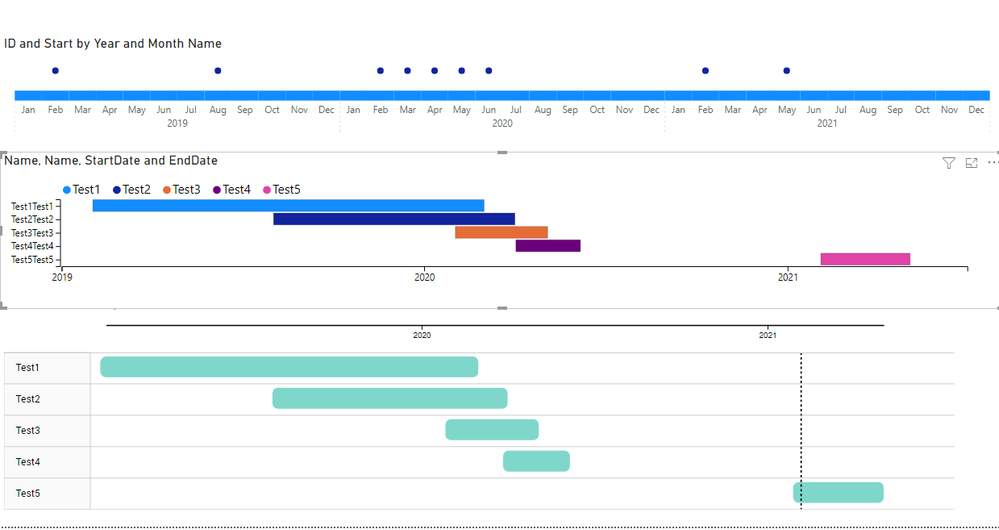
To have this type of information best option is to go for a Gannt chart have you consider it?
There is also the possibility of trying using some dax make a bar and line chart give some information with a tooltip.
Another options is to do a charticulator custom visual.
https://charticulator.com/docs/video-tutorials.html
Chekc the PBIX file with some options:
Regards
Miguel Félix
Proud to be a Super User!
Check out my blog: Power BI em Português
have you tried the TimeLine by querion:
https://appsource.microsoft.com/en-us/product/power-bi-visuals/WA200001804?tab=Overview
Making use of the start date column and formatting it has a YYYY-MM, also adding a new line for each start of the year and making it different from the other got result on top.
PBIX FIle attach.
Regards
Miguel Félix
Proud to be a Super User!
Check out my blog: Power BI em PortuguêsThank you Felix for your time and effort.
its for big boys in company. they need some thing neat and show year in linear and drill side ways,with start and end date or showing some time frame for each project.
Hi @bideveloper555 ,
To have this type of information best option is to go for a Gannt chart have you consider it?
There is also the possibility of trying using some dax make a bar and line chart give some information with a tooltip.
Another options is to do a charticulator custom visual.
https://charticulator.com/docs/video-tutorials.html
Chekc the PBIX file with some options:
Regards
Miguel Félix
Proud to be a Super User!
Check out my blog: Power BI em PortuguêsCheck out the May 2026 Power BI update to learn about new features.
Sign up to receive a private message when registration opens and key events begin.
If you have recently started exploring Fabric, we'd love to hear how it's going. Your feedback can help with product improvements.
| User | Count |
|---|---|
| 31 | |
| 26 | |
| 23 | |
| 22 | |
| 15 |
| User | Count |
|---|---|
| 62 | |
| 47 | |
| 28 | |
| 24 | |
| 20 |