This is best Fabric, Power BI, SQL and AI community event. How do we know? The last event sold out! Save €200 with code FABCMTY200.
Register nowA new Data Days event is coming soon! This time we’re going bigger than ever. Fabric, Power BI, SQL, AI and more. Don't miss out.
Hi,
i have a PBI model where I need to show a Line Chart having 2 measures over the Time.
Then in the table called Calendar 2, use to build a rolling calendar, I calculate a tag "YTD" to limit all the datas only to the ones from January to now.
The Idea is to select YTD in order to focus the line chart only in the period 01/01/2021 - 26/03/2021 (in caso of today).
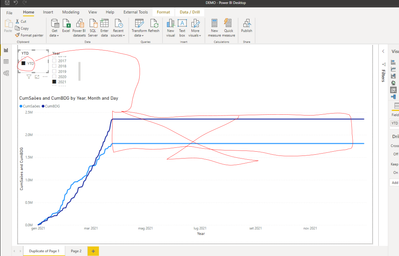
The result I reached is that selecting YTD the measures stop to calculate up to 26/03/2021 but the line charrt continue to show a line.
I'd like to have a x axis with time only for there 3 month or at less not have le constant line from 26/03/2021.
Going on, is it possible to have a dot line after the 26/03/2021?
Solved! Go to Solution.
Hi, @giroldoale
According to your description, I can understand your desription, I’ve also created some data to get your expected output, you can take a look my steps:
I created a measure in the data table like this:
Sum =
IF(
SELECTEDVALUE('Table (2)'[YTD])="YTD",
IF(
MAX('Table'[Date1])<=TODAY(),
SUM('Table'[Amount]),BLANK()),
SUM('Table'[Amount]))
Then I created a line chart and two slicers and place them like this:
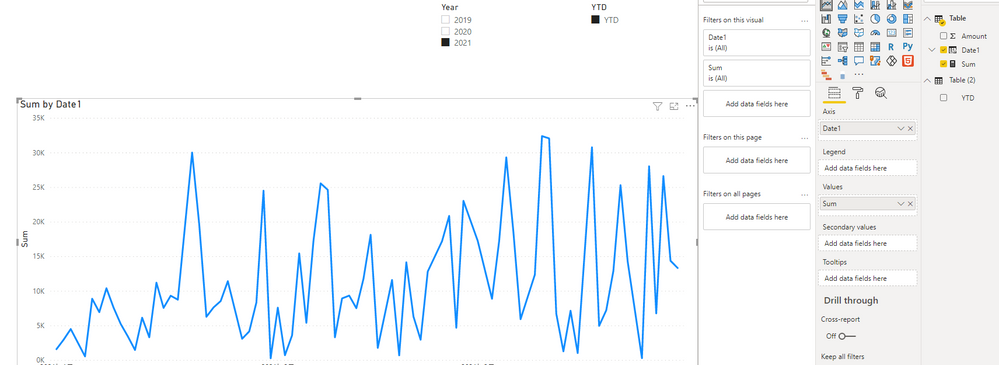
Then I can the line chart automatically disappear the date from start of year to today if I selected “2021” in the date slicer.
If you want to get a dot line after the current day, you can go to the “Analytics” pane of the setting and add a forecast chart like this:
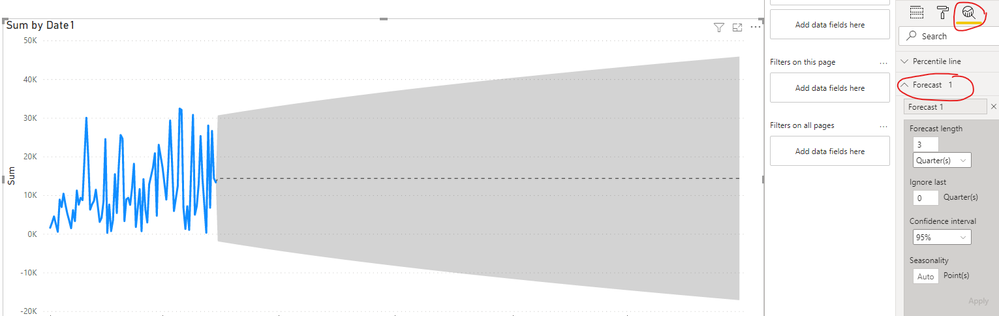
And you can get what you want.
What’s more, you can also set the start and end date of your X-Axis manually here:
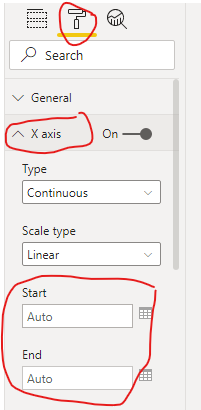
For more detail, you can download my test pbix file here
If this result is not what you want, you can post some sample data(without sensitive data) and your expected result.
How to Get Your Question Answered Quickly
Best Regards,
Community Support Team _Robert Qin
If this post helps, then please consider Accept it as the solution to help the other members find it more quickly.
Hi, @giroldoale
According to your description, I can understand your desription, I’ve also created some data to get your expected output, you can take a look my steps:
I created a measure in the data table like this:
Sum =
IF(
SELECTEDVALUE('Table (2)'[YTD])="YTD",
IF(
MAX('Table'[Date1])<=TODAY(),
SUM('Table'[Amount]),BLANK()),
SUM('Table'[Amount]))
Then I created a line chart and two slicers and place them like this:
Then I can the line chart automatically disappear the date from start of year to today if I selected “2021” in the date slicer.
If you want to get a dot line after the current day, you can go to the “Analytics” pane of the setting and add a forecast chart like this:
And you can get what you want.
What’s more, you can also set the start and end date of your X-Axis manually here:
For more detail, you can download my test pbix file here
If this result is not what you want, you can post some sample data(without sensitive data) and your expected result.
How to Get Your Question Answered Quickly
Best Regards,
Community Support Team _Robert Qin
If this post helps, then please consider Accept it as the solution to help the other members find it more quickly.
Hi, @giroldoale
If it is OK with you, please share your sample pbix file, then I can try to come up with a desirable outcome.
- I think the constant line is because that you do not have value but YTD calculates until the end. In this case, you can limit this by inserting additional condition into the measure. Something like,
if (isblank(actualmeasure), blank(), YTDmeasure......)
Jihwan Kim
If this post helps, then please consider accept it as the solution to help the other members find it more quickly.
Check out the May 2026 Power BI update to learn about new features.
Sign up to receive a private message when registration opens and key events begin.
If you have recently started exploring Fabric, we'd love to hear how it's going. Your feedback can help with product improvements.
| User | Count |
|---|---|
| 29 | |
| 28 | |
| 25 | |
| 20 | |
| 14 |
| User | Count |
|---|---|
| 53 | |
| 47 | |
| 27 | |
| 20 | |
| 19 |