This is best Fabric, Power BI, SQL and AI community event. How do we know? The last event sold out! Save €200 with code FABCMTY200.
Register nowA new Data Days event is coming soon! This time we’re going bigger than ever. Fabric, Power BI, SQL, AI and more. Don't miss out.
Hello,
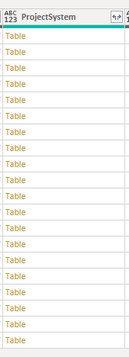
I have a column of tables like below:
I can expand the column to extract the values but that adds a duplicate line for each value - so I am using the below line in my power query to add a column that combines the text from a value in the tables.
Table.AddColumn(#Source, "Project/System", each Text.Combine(Table.Column[ProjectSystem], "Title"), ", "))
This works as expected and I am presented with a new column that combines the values as I like but I do have a few records where this throws an error because the table is empty.
How can I have the above line return null to the new column if the table value is empty?
Thanks,
Zach
Solved! Go to Solution.
@ZachRoberts - have you taken a look at https://docs.microsoft.com/en-us/power-query/handlingerrors ? e.g. try otherwise
Proud to be a Super User!
@ZachRoberts - have you taken a look at https://docs.microsoft.com/en-us/power-query/handlingerrors ? e.g. try otherwise
Proud to be a Super User!
Thanks! That was the ticket 🙂
changed my query to the below and it worked
Table.AddColumn(#Source, "Project/System", each try Text.Combine(Table.Column([ProjectSystem], "Title"),", ") otherwise null)
Sign up to receive a private message when registration opens and key events begin.
If you have recently started exploring Fabric, we'd love to hear how it's going. Your feedback can help with product improvements.
| User | Count |
|---|---|
| 33 | |
| 25 | |
| 23 | |
| 20 | |
| 15 |
| User | Count |
|---|---|
| 64 | |
| 41 | |
| 27 | |
| 22 | |
| 22 |