Don't miss your chance to take the Fabric Data Engineer (DP-600) exam for FREE! Find out how by attending the DP-600 session on April 23rd (pacific time), live or on-demand.
Learn moreNext up in the FabCon + SQLCon recap series: The roadmap for Microsoft SQL and Maximizing Developer experiences in Fabric. All sessions are available on-demand after the live show. Register now
Hi everyone,
I created a flag on tableau which works fine but now I have to translate that in DAX and I tried with if-else and it's throwing me error.
Could you please help me with it?
Tableau code:
If [Code] = 'D'
OR
( [Code] = 'C' and [ID] <> '' and NOT ISNULL([ID]) )
THEN 1 ELSE 0 END
I tried the following code but didn't work and in DAX, AND or OR operators take only 2 parameters and my second part of OR has 3.
Thanks!
Solved! Go to Solution.
Hi @k3rz0rg
It looks like you're creating a calculated column - is that right?
I would suggest this. I've used variables for readability and you can use the && operator instead of the AND function to handle more than 2 conditions.
Also, VALUES isn't needed if you are referring to a column's value in a row context (assuming this is a calculated column). Just use the column reference directly.
Flag =
VAR SaleCode = 'NA Pharmacy Distribution'[Sale_Code]
VAR ContractID = 'NA Pharmacy Distribution'[Contract_ID]
RETURN
IF (
OR (
SaleCode = "D",
SaleCode = "C" && ContractID <> "" && NOT ( ISBLANK ( ContractID ) )
),
1,
0
)
Regards
Hi @OwenAuger , thank you for your response! I was trying to create a calculated measure and almost forgot that I could create a column as well since I'm the owner of the dataset. Your suggestion helped me to solved my purpose!
Hi @k3rz0rg ,
I’d like to acknowledge the valuable input provided by the @OwenAuger . His initial ideas were instrumental in guiding my approach. However, I noticed that further details were needed to fully understand the issue.
In my investigation, I took the following steps:
I create a table as you mentioned.
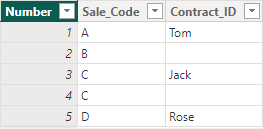
Then I change your DAX code and get what you want.
Column =
IF (
'NA Pharmacy Distribution'[Sale_Code] = "D"
|| (
'NA Pharmacy Distribution'[Sale_Code] = "C"
&& NOT ISBLANK ( 'NA Pharmacy Distribution'[Contract_ID] )
&& 'NA Pharmacy Distribution'[Contract_ID] <> ""
),
1,
0
)
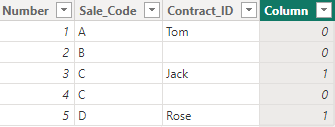
Best Regards
Yilong Zhou
If this post helps, then please consider Accept it as the solution to help the other members find it more quickly.
Hi @k3rz0rg
It looks like you're creating a calculated column - is that right?
I would suggest this. I've used variables for readability and you can use the && operator instead of the AND function to handle more than 2 conditions.
Also, VALUES isn't needed if you are referring to a column's value in a row context (assuming this is a calculated column). Just use the column reference directly.
Flag =
VAR SaleCode = 'NA Pharmacy Distribution'[Sale_Code]
VAR ContractID = 'NA Pharmacy Distribution'[Contract_ID]
RETURN
IF (
OR (
SaleCode = "D",
SaleCode = "C" && ContractID <> "" && NOT ( ISBLANK ( ContractID ) )
),
1,
0
)
Regards
Hi @OwenAuger , thank you for your response! I was trying to create a calculated measure and almost forgot that I could create a column as well since I'm the owner of the dataset. Your suggestion helped me to solved my purpose!
If you have recently started exploring Fabric, we'd love to hear how it's going. Your feedback can help with product improvements.
A new Power BI DataViz World Championship is coming this June! Don't miss out on submitting your entry.
Share feedback directly with Fabric product managers, participate in targeted research studies and influence the Fabric roadmap.
| User | Count |
|---|---|
| 44 | |
| 43 | |
| 38 | |
| 18 | |
| 16 |
| User | Count |
|---|---|
| 67 | |
| 63 | |
| 30 | |
| 30 | |
| 23 |