Get certified for free when you join Fabric Data Days 2026 and dive into Fabric, Power BI, SQL, AI, and other essential data skills.
Join nowJuly 28 - August 9 | Final Round of the Power BI Dataviz World Championships. This is your chance. Learn more
Hello,
Is there a conditional cell colors in power bi? Where do I find it?
Here's what I want to happen:
I have a certain target and if that target was not achieved, cell color should be red.
Thanks,
Solved! Go to Solution.
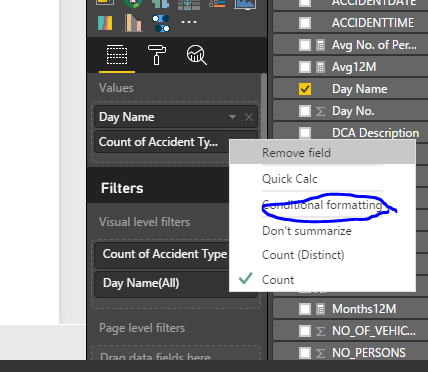
You should have an aggregated data (SUM, COUNT etc.) to activate the conditional formatting option.
see the attacheed screenshot.
Please refer to the DOCUMENTATION explained here.
Hi @BhaveshPatel,
Thanks!
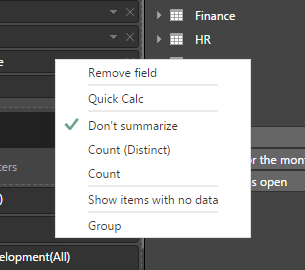
But, there's no conditional formatting option when I right-click the field I want to put a contional formatting to.
Thanks,
You should have an aggregated data (SUM, COUNT etc.) to activate the conditional formatting option.
see the attacheed screenshot.
Thanks! BhaveshPatel!
If you love stickers, then you will definitely want to check out our community sticker challenge, Barcelona edition!
Check out the July 2026 Power BI update to learn about new features.
| User | Count |
|---|---|
| 29 | |
| 28 | |
| 20 | |
| 20 | |
| 19 |
| User | Count |
|---|---|
| 35 | |
| 26 | |
| 20 | |
| 18 | |
| 17 |