Join us at FabCon Atlanta from March 16 - 20, 2026, for the ultimate Fabric, Power BI, AI and SQL community-led event. Save $200 with code FABCOMM.
Register now!Learn from the best! Meet the four finalists headed to the FINALS of the Power BI Dataviz World Championships! Register now
Hello,
Is there a conditional cell colors in power bi? Where do I find it?
Here's what I want to happen:
I have a certain target and if that target was not achieved, cell color should be red.
Thanks,
Solved! Go to Solution.
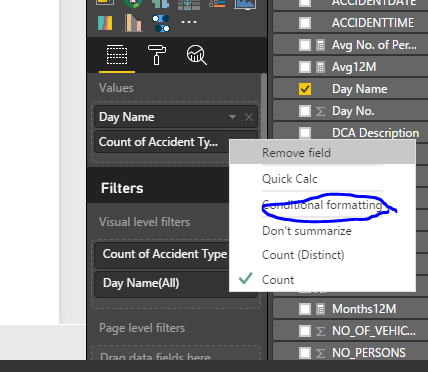
You should have an aggregated data (SUM, COUNT etc.) to activate the conditional formatting option.
see the attacheed screenshot.
Please refer to the DOCUMENTATION explained here.
Hi @BhaveshPatel,
Thanks!
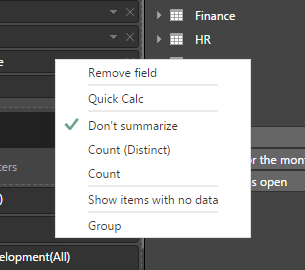
But, there's no conditional formatting option when I right-click the field I want to put a contional formatting to.
Thanks,
You should have an aggregated data (SUM, COUNT etc.) to activate the conditional formatting option.
see the attacheed screenshot.
Thanks! BhaveshPatel!
Share feedback directly with Fabric product managers, participate in targeted research studies and influence the Fabric roadmap.
Check out the February 2026 Power BI update to learn about new features.
| User | Count |
|---|---|
| 63 | |
| 55 | |
| 41 | |
| 16 | |
| 14 |
| User | Count |
|---|---|
| 97 | |
| 80 | |
| 35 | |
| 29 | |
| 25 |