Join us at FabCon Atlanta from March 16 - 20, 2026, for the ultimate Fabric, Power BI, AI and SQL community-led event. Save $200 with code FABCOMM.
Register now!The Power BI Data Visualization World Championships is back! It's time to submit your entry. Live now!
Hi Folks,
Having a wierd issue I hope someone can explain, trying to perform a "self join" in Power Query with a duplicate table to find the next event in a series of events.
Data looks like this:

I can merge the duplicate table ok and the table preview shows the correct data like so:
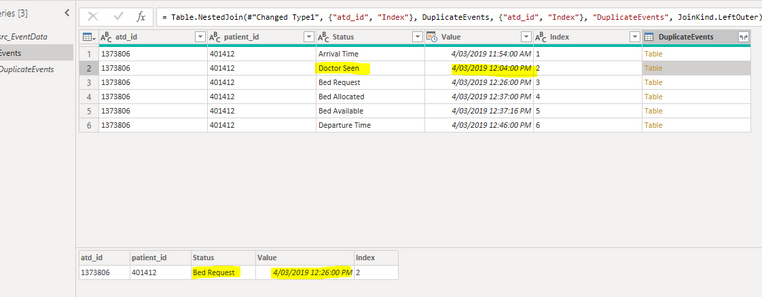
Note that the next event for this object after "Doctor Seen" is "Bed Request"
The issue is that when I click Expand on the column the data swaps around! In this example when I click expand Doctor Seen moves to Index postion 6 and Departure Time moves to position 2 and joins to Bed Request.

I have tried:
So I think its a BUG... any ideas?
Link to PBIX and sample data: https://metroholographics-my.sharepoint.com/:f:/g/personal/admin_dearwatson_net_au/EuL0GXNqNBVKnZFfw...
To replicate go to the "Events" table in Power Query and observe the "Merged Queries" step then the "Expanded DuplicateEvents" Step
Solved! Go to Solution.
@dearwatson
I checked and found the culprit; it seems to be the sort that doesn't retain the status, joins change order. Wrap your
Sorted Rows step in Events Table as
Table.Buffer(Table.Sort(#"Renamed Columns",{{"atd_id", Order.Descending}, {"Value", Order.Ascending}}))
Before Expand
Same after Expand
________________________
Did I answer your question? Mark this post as a solution, this will help others!.
I accept KUDOS 🙂
⭕ Subscribe and learn Power BI from these videos
⚪ Website ⚪ LinkedIn ⚪ PBI User Group
@dearwatson
I checked and found the culprit; it seems to be the sort that doesn't retain the status, joins change order. Wrap your
Sorted Rows step in Events Table as
Table.Buffer(Table.Sort(#"Renamed Columns",{{"atd_id", Order.Descending}, {"Value", Order.Ascending}}))
Before Expand
Same after Expand
________________________
Did I answer your question? Mark this post as a solution, this will help others!.
I accept KUDOS 🙂
⭕ Subscribe and learn Power BI from these videos
⚪ Website ⚪ LinkedIn ⚪ PBI User Group
The Power BI Data Visualization World Championships is back! It's time to submit your entry.
Check out the January 2026 Power BI update to learn about new features.
| User | Count |
|---|---|
| 69 | |
| 45 | |
| 36 | |
| 28 | |
| 23 |
| User | Count |
|---|---|
| 135 | |
| 121 | |
| 58 | |
| 40 | |
| 32 |

