Join us at FabCon Atlanta from March 16 - 20, 2026, for the ultimate Fabric, Power BI, AI and SQL community-led event. Save $200 with code FABCOMM.
Register now!Learn from the best! Meet the four finalists headed to the FINALS of the Power BI Dataviz World Championships! Register now
I have a sales table matrix grouped by customer and article, this table is a TOP 2 sales
Does anyone know how I can show the total sales of all customers who are not part of the TOP 2 in a separate line from the top?
Table
Solved! Go to Solution.
Hi @ngomes ,
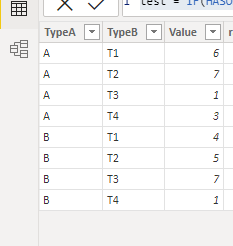
Refer the following sample:
First ,create rank column:
rank = RANKX(FILTER('Table','Table'[TypeA]=EARLIER('Table'[TypeA])),'Table'[Value])
Then create the below measure:
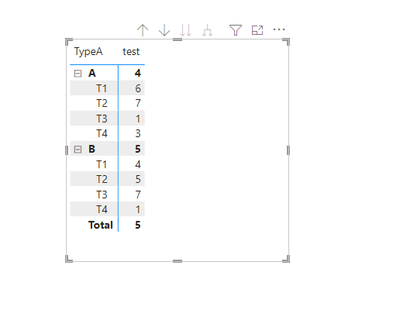
test = IF(HASONEVALUE('Table'[TypeB]),MAX('Table'[Value]),CALCULATE(SUM('Table'[Value]),FILTER(ALL('Table'),'Table'[TypeA]=MAX('Table'[TypeA])&&'Table'[rank]>2)))
Create visual:
You could adjust base on your table and need.
Did I answer your question? Mark my post as a solution!
Best Regards
Lucien
Hi @ngomes ,
Refer the following sample:
First ,create rank column:
rank = RANKX(FILTER('Table','Table'[TypeA]=EARLIER('Table'[TypeA])),'Table'[Value])
Then create the below measure:
test = IF(HASONEVALUE('Table'[TypeB]),MAX('Table'[Value]),CALCULATE(SUM('Table'[Value]),FILTER(ALL('Table'),'Table'[TypeA]=MAX('Table'[TypeA])&&'Table'[rank]>2)))
Create visual:
You could adjust base on your table and need.
Did I answer your question? Mark my post as a solution!
Best Regards
Lucien
hello James
I know the video
This example does not have groups and what I am asking is how to obtain the value of the remaining customers knowing that I have the group customers articles/services
Share feedback directly with Fabric product managers, participate in targeted research studies and influence the Fabric roadmap.
Check out the February 2026 Power BI update to learn about new features.
| User | Count |
|---|---|
| 49 | |
| 46 | |
| 35 | |
| 15 | |
| 14 |
| User | Count |
|---|---|
| 90 | |
| 75 | |
| 41 | |
| 26 | |
| 26 |