Join us at FabCon Atlanta from March 16 - 20, 2026, for the ultimate Fabric, Power BI, AI and SQL community-led event. Save $200 with code FABCOMM.
Register now!The Power BI Data Visualization World Championships is back! Get ahead of the game and start preparing now! Learn more
I have a sales table matrix grouped by customer and article, this table is a TOP 2 sales
Does anyone know how I can show the total sales of all customers who are not part of the TOP 2 in a separate line from the top?
Table
Solved! Go to Solution.
Hi @ngomes ,
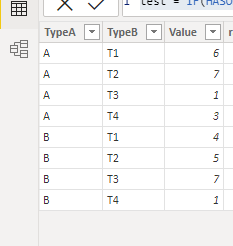
Refer the following sample:
First ,create rank column:
rank = RANKX(FILTER('Table','Table'[TypeA]=EARLIER('Table'[TypeA])),'Table'[Value])
Then create the below measure:
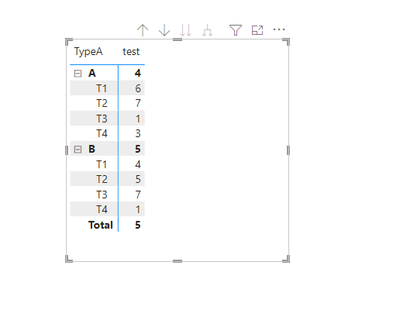
test = IF(HASONEVALUE('Table'[TypeB]),MAX('Table'[Value]),CALCULATE(SUM('Table'[Value]),FILTER(ALL('Table'),'Table'[TypeA]=MAX('Table'[TypeA])&&'Table'[rank]>2)))
Create visual:
You could adjust base on your table and need.
Did I answer your question? Mark my post as a solution!
Best Regards
Lucien
Hi @ngomes ,
Refer the following sample:
First ,create rank column:
rank = RANKX(FILTER('Table','Table'[TypeA]=EARLIER('Table'[TypeA])),'Table'[Value])
Then create the below measure:
test = IF(HASONEVALUE('Table'[TypeB]),MAX('Table'[Value]),CALCULATE(SUM('Table'[Value]),FILTER(ALL('Table'),'Table'[TypeA]=MAX('Table'[TypeA])&&'Table'[rank]>2)))
Create visual:
You could adjust base on your table and need.
Did I answer your question? Mark my post as a solution!
Best Regards
Lucien
hello James
I know the video
This example does not have groups and what I am asking is how to obtain the value of the remaining customers knowing that I have the group customers articles/services
The Power BI Data Visualization World Championships is back! Get ahead of the game and start preparing now!
| User | Count |
|---|---|
| 39 | |
| 36 | |
| 33 | |
| 31 | |
| 28 |
| User | Count |
|---|---|
| 129 | |
| 88 | |
| 79 | |
| 68 | |
| 63 |