Join us at FabCon Atlanta from March 16 - 20, 2026, for the ultimate Fabric, Power BI, AI and SQL community-led event. Save $200 with code FABCOMM.
Register now!The Power BI Data Visualization World Championships is back! Get ahead of the game and start preparing now! Learn more
Hello,
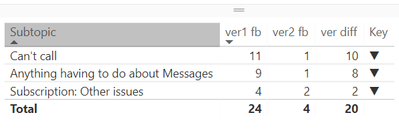
Could somebody please have a look at the switch measure and tell me why it is not working? it should show upper arrow.
Key = SWITCH( TRUE(), [ver1 fb]<[ver2 fb], UNICHAR(9660), [ver1 fb]>[ver2 fb], UNICHAR(9650), UNICHAR(9644) )
Solved! Go to Solution.
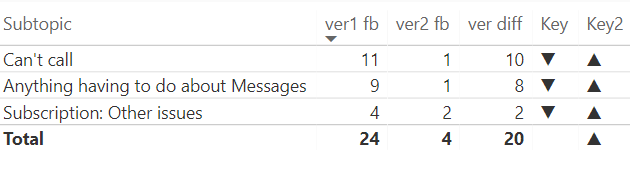
Strange, but the IF f-on works well in this case. Luckely, there is no need for more nested IFs 🙂
Key2 = IF( [ver1 fb]<[ver2 fb], UNICHAR(9660), IF( [ver1 fb]>[ver2 fb], UNICHAR(9650),UNICHAR(9644)) )
Strange, but the IF f-on works well in this case. Luckely, there is no need for more nested IFs 🙂
Key2 = IF( [ver1 fb]<[ver2 fb], UNICHAR(9660), IF( [ver1 fb]>[ver2 fb], UNICHAR(9650),UNICHAR(9644)) )
OK, that's the second one today that I can't recreate. I tried by entering in your data and then adding a calculated column. I used a calculated column because there is no aggregation that would indicate that it is a measure. I get up arrows. I'm on the March 2018 edition.
Hi Greg,
Actually there is aggreagation. Both var1 fb and var2 fb are counts of responses by different criteria.
I am also working on the March edition, but will try to reinstall anyway.
do you maybe have another suggestion? thank you for support though 🙂
OK, so "var1 fb" and "var2 fb" are measures then. I'll try to recreate it with measures.
The Power BI Data Visualization World Championships is back! Get ahead of the game and start preparing now!
| User | Count |
|---|---|
| 38 | |
| 36 | |
| 33 | |
| 33 | |
| 29 |
| User | Count |
|---|---|
| 132 | |
| 90 | |
| 81 | |
| 66 | |
| 65 |