cancel
Showing results for 
Search instead for 
Did you mean: 

The Power BI Data Visualization World Championships is back! Get ahead of the game and start preparing now! Learn more

Reply
TommyMossberg
Helper I
Helper I

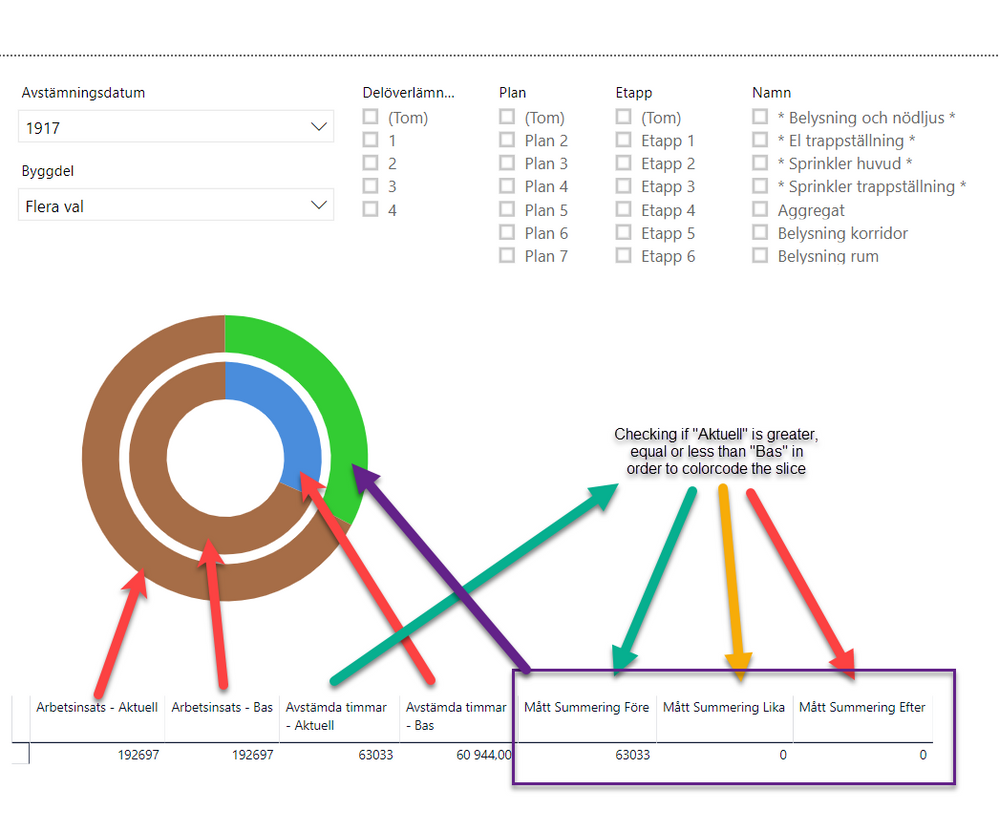
Sunburst with two circles representing actual progress vs planned progress

I have multiple sharts/reports that I whant do present on a dashboard but I can't figure out how to solve this problem I have with the sunburstdiagrams. 


In my reports I tweeked this by adding two diffrent sunbursts and laying them above each other. And I can't do that on a dashboard. 

This is what it looks like 
2019-04-27_21-36-06.pngHow do I make the inner circle based on the "... - Bas" values and the outer circle based on "... - Aktuell"?

1 ACCEPTED SOLUTION
Anonymous
Not applicable

Hey @TommyMossberg 


You can use SVG for that.

Please look at this video, there are more/others, just search for it.


For example:
I have a table with 2 columns, radius 1 and radius 2.

I have added 2 custom columns with the svg/html code.

The only property that is dynamically changed, in this example, is the radius, but any property can be controled and chnaged the same.

Circle1 = "<svg xmlns='http://www/w3/org/200/svg' viewBox='0 0 20 20'>
<circle  fill=' blue '  r='"& Table1[R2] &"' cx='5' cy='5'>
</svg>"

Circle2 = "
<svg xmlns='http://www/w3/org/200/svg' viewBox='0 0 20 20'>
<circle  fill=' green '  r='"& Table1[R1] &"' cx='5' cy='5'>
</svg>"

Add a HTML viewer and show the columns, should show you circles.

Place the HTML containers on top of each other, so circles will show one on top the other.

This is how it looks (Circle1 on top of Circle2) -->
2019-05-20 11_00_41-papercut - Remote Desktop Connection.png


You can add more HTML tags like opacity, stroke, sizes, colors and more.

Examples of SVG properties - https://www.w3schools.com/html/html5_svg.asp


Good luck!
A


View solution in original post

4 REPLIES 4
Anonymous
Not applicable

Hi @TommyMossberg 
Have you watched this? 

https://www.youtube.com/watch?v=ADCvMkVV_fg


Cheers!

Hi @Anonymous 
I've tried with that sunburst visualization but with no luck.


The problem, as I see it, is that the outer circle is still based on the values in the inner circle.
What I want is two circles where the inner circle is based on som columns and the outer circel is based on other columns whitout any dataconecctions between the circles.

They are only for visualization to show actual progress (outer) and planned progress (inner).
 

Anonymous
Not applicable

Hey @TommyMossberg 


You can use SVG for that.

Please look at this video, there are more/others, just search for it.


For example:
I have a table with 2 columns, radius 1 and radius 2.

I have added 2 custom columns with the svg/html code.

The only property that is dynamically changed, in this example, is the radius, but any property can be controled and chnaged the same.

Circle1 = "<svg xmlns='http://www/w3/org/200/svg' viewBox='0 0 20 20'>
<circle  fill=' blue '  r='"& Table1[R2] &"' cx='5' cy='5'>
</svg>"

Circle2 = "
<svg xmlns='http://www/w3/org/200/svg' viewBox='0 0 20 20'>
<circle  fill=' green '  r='"& Table1[R1] &"' cx='5' cy='5'>
</svg>"

Add a HTML viewer and show the columns, should show you circles.

Place the HTML containers on top of each other, so circles will show one on top the other.

This is how it looks (Circle1 on top of Circle2) -->
2019-05-20 11_00_41-papercut - Remote Desktop Connection.png


You can add more HTML tags like opacity, stroke, sizes, colors and more.

Examples of SVG properties - https://www.w3schools.com/html/html5_svg.asp


Good luck!
A


@Anonymous Thank you!


svg will solve this specific problem for me and give me completely different toolbox to tweak the presentation of different data.


This will be fun! 


Helpful resources

Announcements
Power BI DataViz World Championships

Power BI Dataviz World Championships

The Power BI Data Visualization World Championships is back! Get ahead of the game and start preparing now!

December 2025 Power BI Update Carousel

Power BI Monthly Update - December 2025

Check out the December 2025 Power BI Holiday Recap!

FabCon Atlanta 2026 carousel

FabCon Atlanta 2026

Join us at FabCon Atlanta, March 16-20, for the ultimate Fabric, Power BI, AI and SQL community-led event. Save $200 with code FABCOMM.