cancel
Showing results for 
Search instead for 
Did you mean: 

The Power BI Data Visualization World Championships is back! Get ahead of the game and start preparing now! Learn more

Reply
ViralPatel212
Resolver I
Resolver I

Summary Table visual

Hello Team,


This may be hard to explain but here goes! 

I am trying to create a table visual where it summarises the ranking of our dealers barclays based off our data points "Clients"

The ranking is based of Sum of Volume


We have several clients where they provide data and within each data they have dealers.

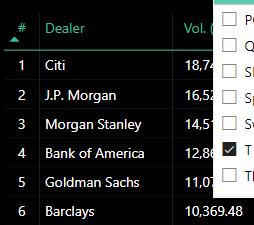
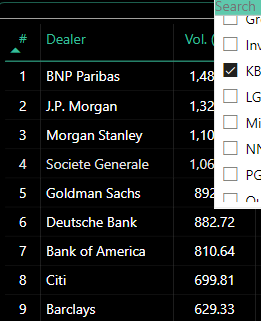
When i filter the data by client i.e. " T Rowe Price" barclays is ranked 6th and when i change the filter to "KBC" barclays is ranked 9th

ViralPatel212_0-1710249050130.png

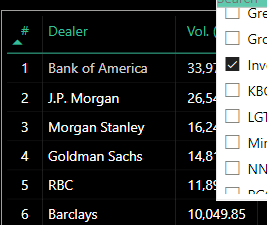
ViralPatel212_1-1710249077631.png

ViralPatel212_2-1710249097439.png


I want to create a summarized table with that information for Barclays:

ClientRank
T Rowe Price6
Invesco6
KBC9
1 ACCEPTED SOLUTION
ViralPatel212
Resolver I
Resolver I

I have resolved this issue. 


created a measure for barclays

Measure: 
var _rank = RANKX(ALL('Dealer Ranking'[Counter Party]),[Ranking Size (Vol)],,DESC)
VAR _tab =
    FILTER (
        ADDCOLUMNS (
            ALL( 'Dealer Ranking'[Counter Party] ),
            "@rank", [Dealer Ranking Number 2 test]
        ),
        [Counter Party] = "Barclays"
    )
VAR _rankbarclays =
   CALCULATE( MAXX ( _tab, [@rank] ), REMOVEFILTERS('Dealer Ranking'[Glimpse_buy_side]))


RETURN

_rankbarclays


View solution in original post

4 REPLIES 4
ViralPatel212
Resolver I
Resolver I

I have resolved this issue. 


created a measure for barclays

Measure: 
var _rank = RANKX(ALL('Dealer Ranking'[Counter Party]),[Ranking Size (Vol)],,DESC)
VAR _tab =
    FILTER (
        ADDCOLUMNS (
            ALL( 'Dealer Ranking'[Counter Party] ),
            "@rank", [Dealer Ranking Number 2 test]
        ),
        [Counter Party] = "Barclays"
    )
VAR _rankbarclays =
   CALCULATE( MAXX ( _tab, [@rank] ), REMOVEFILTERS('Dealer Ranking'[Glimpse_buy_side]))


RETURN

_rankbarclays


ViralPatel212
Resolver I
Resolver I

@Greg_Deckler 

Hi Greg, where you able to access the files?

thanks


Greg_Deckler
Community Champion
Community Champion

@ViralPatel212 Sorry, having trouble following, can you post sample data as text and expected output?
Not really enough information to go on, please first check if your issue is a common issue listed here: https://community.powerbi.com/t5/Community-Blog/Before-You-Post-Read-This/ba-p/1116882

Also, please see this post regarding How to Get Your Question Answered Quickly: https://community.powerbi.com/t5/Community-Blog/How-to-Get-Your-Question-Answered-Quickly/ba-p/38490

The most important parts are:
1. Sample data as text, use the table tool in the editing bar
2. Expected output from sample data
3. Explanation in words of how to get from 1. to 2.


Follow on LinkedIn
@ me in replies or I'll lose your thread!!!
Instead of a Kudo, please vote for this idea
Become an expert!: Enterprise DNA
External Tools: MSHGQM
YouTube Channel!: Microsoft Hates Greg
Latest book!:
DAX For Humans

DAX is easy, CALCULATE makes DAX hard...

@Greg_Deckler  Apologies for the confusion. 

Here is the sample data as requestion with the Pbix File. In the report i have created a expected table that i want to create. In this example, i have used J.P. Morgan rather than Barclays. 

Outcome, i want to see the ranking position of J.P.Morgan against each client.


I didn't know how to upload the files so i added it to google drive: 

https://drive.google.com/drive/folders/1Oj1ZdJifZHwdSc6CimPOtZEEtW5lTsOd?usp=sharing


Hopefully this make sense.

Helpful resources

Announcements
Power BI DataViz World Championships

Power BI Dataviz World Championships

The Power BI Data Visualization World Championships is back! Get ahead of the game and start preparing now!

December 2025 Power BI Update Carousel

Power BI Monthly Update - December 2025

Check out the December 2025 Power BI Holiday Recap!

FabCon Atlanta 2026 carousel

FabCon Atlanta 2026

Join us at FabCon Atlanta, March 16-20, for the ultimate Fabric, Power BI, AI and SQL community-led event. Save $200 with code FABCOMM.