Don't miss your chance to take the Fabric Data Engineer (DP-600) exam for FREE! Find out how by watching the DP-600 session on-demand now through April 28th.
Learn moreJoin the FabCon + SQLCon recap series. Up next: Power BI, Real-Time Intelligence, IQ and AI, and Data Factory take center stage. All sessions are available on-demand after the live show. Register now
Hello Team,
This may be hard to explain but here goes!
I am trying to create a table visual where it summarises the ranking of our dealers barclays based off our data points "Clients"
The ranking is based of Sum of Volume
We have several clients where they provide data and within each data they have dealers.
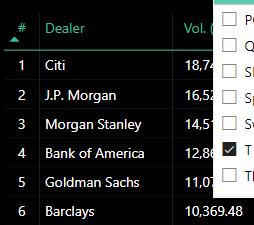
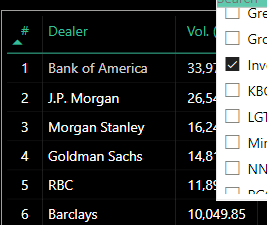
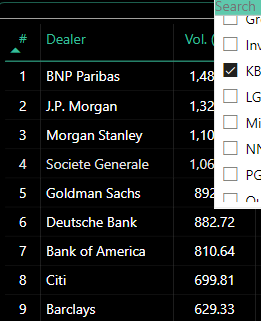
When i filter the data by client i.e. " T Rowe Price" barclays is ranked 6th and when i change the filter to "KBC" barclays is ranked 9th
I want to create a summarized table with that information for Barclays:
| Client | Rank |
| T Rowe Price | 6 |
| Invesco | 6 |
| KBC | 9 |
Solved! Go to Solution.
I have resolved this issue.
created a measure for barclays
Measure:
var _rank = RANKX(ALL('Dealer Ranking'[Counter Party]),[Ranking Size (Vol)],,DESC)
VAR _tab =
FILTER (
ADDCOLUMNS (
ALL( 'Dealer Ranking'[Counter Party] ),
"@rank", [Dealer Ranking Number 2 test]
),
[Counter Party] = "Barclays"
)
VAR _rankbarclays =
CALCULATE( MAXX ( _tab, [@rank] ), REMOVEFILTERS('Dealer Ranking'[Glimpse_buy_side]))
RETURN
_rankbarclays
I have resolved this issue.
created a measure for barclays
Measure:
var _rank = RANKX(ALL('Dealer Ranking'[Counter Party]),[Ranking Size (Vol)],,DESC)
VAR _tab =
FILTER (
ADDCOLUMNS (
ALL( 'Dealer Ranking'[Counter Party] ),
"@rank", [Dealer Ranking Number 2 test]
),
[Counter Party] = "Barclays"
)
VAR _rankbarclays =
CALCULATE( MAXX ( _tab, [@rank] ), REMOVEFILTERS('Dealer Ranking'[Glimpse_buy_side]))
RETURN
_rankbarclays
@ViralPatel212 Sorry, having trouble following, can you post sample data as text and expected output?
Not really enough information to go on, please first check if your issue is a common issue listed here: https://community.powerbi.com/t5/Community-Blog/Before-You-Post-Read-This/ba-p/1116882
Also, please see this post regarding How to Get Your Question Answered Quickly: https://community.powerbi.com/t5/Community-Blog/How-to-Get-Your-Question-Answered-Quickly/ba-p/38490
The most important parts are:
1. Sample data as text, use the table tool in the editing bar
2. Expected output from sample data
3. Explanation in words of how to get from 1. to 2.
@Greg_Deckler Apologies for the confusion.
Here is the sample data as requestion with the Pbix File. In the report i have created a expected table that i want to create. In this example, i have used J.P. Morgan rather than Barclays.
Outcome, i want to see the ranking position of J.P.Morgan against each client.
I didn't know how to upload the files so i added it to google drive:
https://drive.google.com/drive/folders/1Oj1ZdJifZHwdSc6CimPOtZEEtW5lTsOd?usp=sharing
Hopefully this make sense.
Check out the April 2026 Power BI update to learn about new features.
If you have recently started exploring Fabric, we'd love to hear how it's going. Your feedback can help with product improvements.
A new Power BI DataViz World Championship is coming this June! Don't miss out on submitting your entry.
| User | Count |
|---|---|
| 41 | |
| 37 | |
| 34 | |
| 21 | |
| 16 |
| User | Count |
|---|---|
| 64 | |
| 58 | |
| 31 | |
| 25 | |
| 25 |