Don't miss your chance to take the Fabric Data Engineer (DP-600) exam for FREE! Find out how by watching the DP-600 session on-demand now through April 28th.
Learn moreJoin the FabCon + SQLCon recap series. Up next: Power BI, Real-Time Intelligence, IQ and AI, and Data Factory take center stage. All sessions are available on-demand after the live show. Register now
Hi,
I spent a lot of time on this and now I'm looking for help.
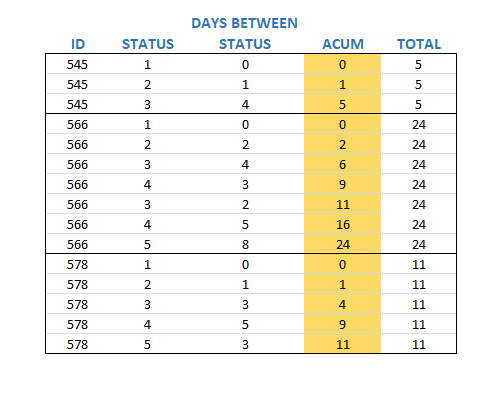
I need to summarize lines of an ID. It sounds easy, but the result that I need is a little bit different, and I'm showing it below:
I'm looking for the yellow column. All the others I have.
I tried using SUM, SUMX, CALCULATE, SUMMARIZE, .....
There is anyone with an idea to solve this?
Thanks a lot.
Solved! Go to Solution.
Hi @Anonymous ,
If you want to calculate the column ACUM which you highlight in your image, you could try the steps below.
1. Create the index column in query editor.
2. Create the group index calculated column with dax.
group index =
RANKX (
FILTER ( 'Table', EARLIER ( 'Table'[ID] ) = 'Table'[ID] ),
'Table'[Index],
,
ASC
)
3. Create the measure with the formula below.
Measure =
CALCULATE (
SUM ( 'Table'[STATUS_] ),
FILTER (
ALLEXCEPT ( 'Table', 'Table'[ID] ),
'Table'[group index] <= MAX ( 'Table'[group index] )
)
)
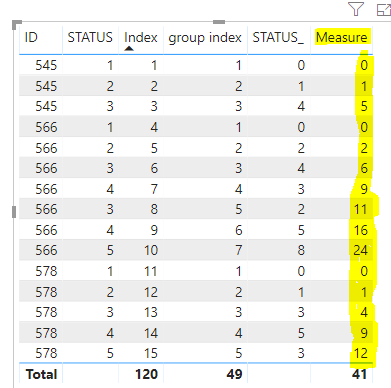
Here is the output.
If you still need help, free to ask.
Best Regards,
Cherry
Hi @Anonymous ,
If you want to calculate the column ACUM which you highlight in your image, you could try the steps below.
1. Create the index column in query editor.
2. Create the group index calculated column with dax.
group index =
RANKX (
FILTER ( 'Table', EARLIER ( 'Table'[ID] ) = 'Table'[ID] ),
'Table'[Index],
,
ASC
)
3. Create the measure with the formula below.
Measure =
CALCULATE (
SUM ( 'Table'[STATUS_] ),
FILTER (
ALLEXCEPT ( 'Table', 'Table'[ID] ),
'Table'[group index] <= MAX ( 'Table'[group index] )
)
)
Here is the output.
If you still need help, free to ask.
Best Regards,
Cherry
Hello @Anonymous
Try this function:
Hi @Anonymous ,
Thanks a lot for so fast answer.
It didn't work.
The TOTAL column has the same value to all rows.
Regards.
sorry brother, i had understood that u need the last value accumulated, but i need a function to sum each value through status =/
Relax and thanks for the attempt.
Check out the April 2026 Power BI update to learn about new features.
If you have recently started exploring Fabric, we'd love to hear how it's going. Your feedback can help with product improvements.
A new Power BI DataViz World Championship is coming this June! Don't miss out on submitting your entry.
| User | Count |
|---|---|
| 42 | |
| 38 | |
| 33 | |
| 21 | |
| 15 |
| User | Count |
|---|---|
| 64 | |
| 59 | |
| 31 | |
| 27 | |
| 25 |