cancel
Showing results for 
Search instead for 
Did you mean: 

The Power BI Data Visualization World Championships is back! Get ahead of the game and start preparing now! Learn more

Reply
Anonymous
Not applicable

Summarizing rows

Hi,


I spent a lot of time on this and now I'm looking for help.


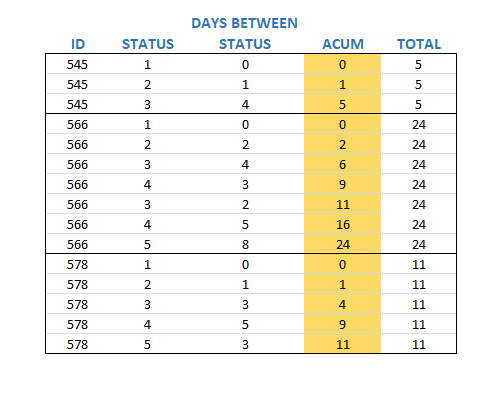
I need to summarize lines of an ID. It sounds easy, but the result that I need is a little bit different, and I'm showing it below:


Capture.PNG

I'm looking for the yellow column. All the others I have.


I tried using SUM, SUMX, CALCULATE, SUMMARIZE, .....


There is anyone with an idea to solve this?


Thanks a lot.

1 ACCEPTED SOLUTION
v-piga-msft
Resident Rockstar
Resident Rockstar

Hi @Anonymous ,

If you want to calculate the column ACUM which you highlight in your image, you could try the steps below.

1. Create the index column in query editor.

2. Create the group index calculated column with dax.

group index = 
RANKX (
    FILTER ( 'Table', EARLIER ( 'Table'[ID] ) = 'Table'[ID] ),
    'Table'[Index],
    ,
    ASC
)

3. Create the measure with the formula below.

Measure =
CALCULATE (
    SUM ( 'Table'[STATUS_] ),
    FILTER (
        ALLEXCEPT ( 'Table', 'Table'[ID] ),
        'Table'[group index] <= MAX ( 'Table'[group index] )
    )
)

Here is the output.
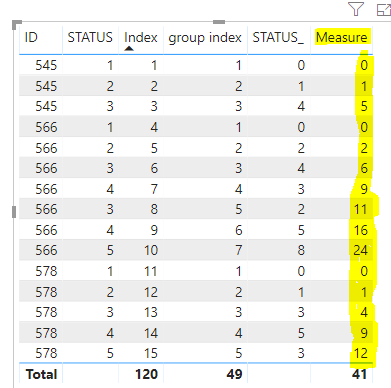
Capture.PNG

If you still need help, free to ask.

Best Regards,

Cherry


Community Support Team _ Cherry Gao
If this post helps, then please consider Accept it as the solution to help the other members find it more quickly.

View solution in original post

5 REPLIES 5
v-piga-msft
Resident Rockstar
Resident Rockstar

Hi @Anonymous ,

If you want to calculate the column ACUM which you highlight in your image, you could try the steps below.

1. Create the index column in query editor.

2. Create the group index calculated column with dax.

group index = 
RANKX (
    FILTER ( 'Table', EARLIER ( 'Table'[ID] ) = 'Table'[ID] ),
    'Table'[Index],
    ,
    ASC
)

3. Create the measure with the formula below.

Measure =
CALCULATE (
    SUM ( 'Table'[STATUS_] ),
    FILTER (
        ALLEXCEPT ( 'Table', 'Table'[ID] ),
        'Table'[group index] <= MAX ( 'Table'[group index] )
    )
)

Here is the output.

Capture.PNG

If you still need help, free to ask.

Best Regards,

Cherry


Community Support Team _ Cherry Gao
If this post helps, then please consider Accept it as the solution to help the other members find it more quickly.
Anonymous
Not applicable

Hello @Anonymous 


Try this function:


MaxAcum = CALCULATE(MAX(Table[Total]);ALLEXCEPT(Table;Table[ID]))
Anonymous
Not applicable

Hi @Anonymous ,


Thanks a lot for so fast answer.


It didn't work.


The TOTAL column has the same value to all rows.


Regards.

Anonymous
Not applicable

sorry brother, i had understood that u need the last value accumulated, but i need a function to sum each value through status =/

Anonymous
Not applicable

Relax and thanks for the attempt.


Helpful resources

Announcements
Power BI DataViz World Championships

Power BI Dataviz World Championships

The Power BI Data Visualization World Championships is back! Get ahead of the game and start preparing now!

December 2025 Power BI Update Carousel

Power BI Monthly Update - December 2025

Check out the December 2025 Power BI Holiday Recap!

FabCon Atlanta 2026 carousel

FabCon Atlanta 2026

Join us at FabCon Atlanta, March 16-20, for the ultimate Fabric, Power BI, AI and SQL community-led event. Save $200 with code FABCOMM.

Top Solution Authors