Don't miss your chance to take the Fabric Data Engineer (DP-700) exam on us!
Learn moreWe've captured the moments from FabCon & SQLCon that everyone is talking about, and we are bringing them to the community, live and on-demand. Starts on April 14th. Register now
I am trying to Summarize a Table and calculate running total in a new Table
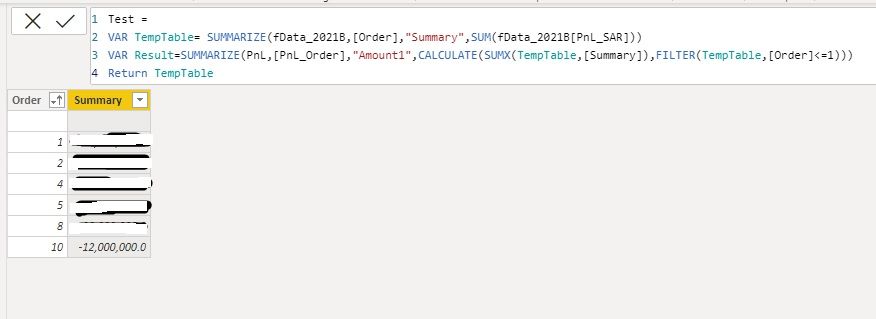
As you can see in the attached pictures, the TempTable (1st Picture) with its DAX codes
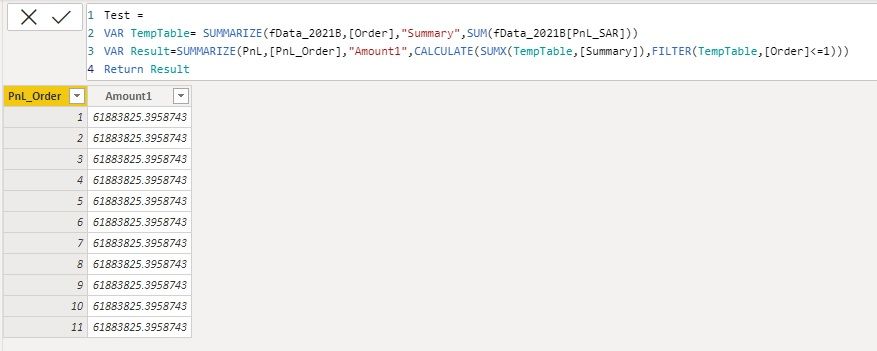
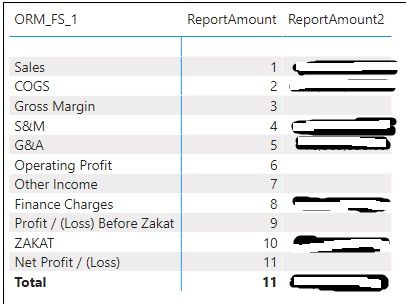
and when I try to SUMX the Column "Summary" from TempTabel to my result table its not workig at row level, I want to add up only if the values in [Order] is less than or equal to the row value in my result table [PnL_Order], somthing similar to a running total.
Any help is appreciated.
Solved! Go to Solution.
Please try it with this change
To learn more about Power BI, follow me on Twitter or subscribe on YouTube.
not the best but maybe quickest solution
var result =
summarize(pnl, [Pnl_Order], "Amount1",
var _curOrder = MAX ([Pnl_Order])
RETURN
CALCULATE(SUMX(temptable, [Summary]), temptable[Order] <= _curOrder )
I cannot use "temptable[Order]" its coming from VAR above, so instead I tried to use it inside a FILTER and the result is same:
Please try it with this change
To learn more about Power BI, follow me on Twitter or subscribe on YouTube.
Do you have any thoughts about why the same concept would not give me a result in all rows, when I use it in a Measure instead of a Table
If you have recently started exploring Fabric, we'd love to hear how it's going. Your feedback can help with product improvements.
A new Power BI DataViz World Championship is coming this June! Don't miss out on submitting your entry.
Share feedback directly with Fabric product managers, participate in targeted research studies and influence the Fabric roadmap.
| User | Count |
|---|---|
| 55 | |
| 40 | |
| 36 | |
| 20 | |
| 18 |
| User | Count |
|---|---|
| 73 | |
| 72 | |
| 38 | |
| 35 | |
| 26 |