This is best Fabric, Power BI, SQL and AI community event. How do we know? The last event sold out! Save €200 with code FABCMTY200.
Register nowThe Fabric community is upgrading! Read all of the details including the timeline and what you can expect. Learn more
I am trying to Summarize a Table and calculate running total in a new Table
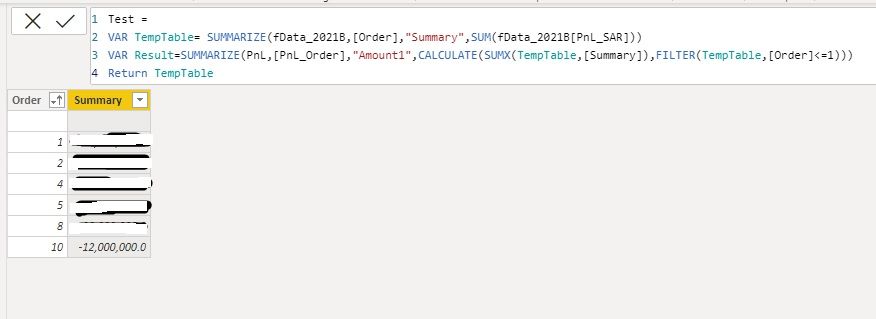
As you can see in the attached pictures, the TempTable (1st Picture) with its DAX codes
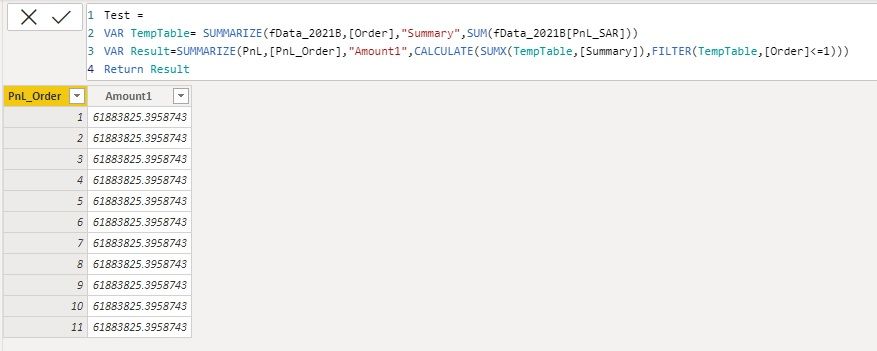
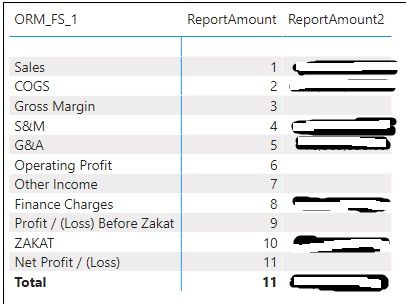
and when I try to SUMX the Column "Summary" from TempTabel to my result table its not workig at row level, I want to add up only if the values in [Order] is less than or equal to the row value in my result table [PnL_Order], somthing similar to a running total.
Any help is appreciated.
Solved! Go to Solution.
Please try it with this change
To learn more about Power BI, follow me on Twitter or subscribe on YouTube.
not the best but maybe quickest solution
var result =
summarize(pnl, [Pnl_Order], "Amount1",
var _curOrder = MAX ([Pnl_Order])
RETURN
CALCULATE(SUMX(temptable, [Summary]), temptable[Order] <= _curOrder )
I cannot use "temptable[Order]" its coming from VAR above, so instead I tried to use it inside a FILTER and the result is same:
Please try it with this change
To learn more about Power BI, follow me on Twitter or subscribe on YouTube.
Do you have any thoughts about why the same concept would not give me a result in all rows, when I use it in a Measure instead of a Table
Join us in Barcelona for FabCon and SQLCon, the Fabric, Power BI, SQL, and AI community event. Save €200 with code FABCMTY200.
| User | Count |
|---|---|
| 27 | |
| 22 | |
| 20 | |
| 18 | |
| 14 |
| User | Count |
|---|---|
| 25 | |
| 20 | |
| 20 | |
| 20 | |
| 20 |