Get certified for free when you join Fabric Data Days 2026 and dive into Fabric, Power BI, SQL, AI, and other essential data skills.
Join nowTry your skills in the Power BI Dataviz World Championship! Round one ends June 26. Join now
Hi
I am new to PBI, and I need to calculate a column, or make a new table where I can see infomration of 2 tables:
I have a table called 'CLIENT 'where existe the column [ID_CLIENT], it has unique data,
and I have a second table called' DELIVERY ', where I have the same column [ID_CLIENT], but in this table I have information from many more customers.
How can I get only the information that is on the 'DELIVERY¨ table, but only the customers of the tabala' CLIENT' only,
How I can remove the second table´s information acording to the clients I have in the first one
Here is an example:
'CLIENT
| ID_CLIENT | IV | FV |
| 102318 | 9:00:00 | 17:00:00 |
| 108439 | 8:00:00 | 16:00:00 |
| 101174 | 8:00:00 | 12:00:00 |
'DELIVERY´
| ID_CLIENT | Delivery Hour |
| 102318 | 10:00 |
| 108439 | 11:00 |
| 101174 | 13:23 |
| 101145 | 12:00 |
| 101243 | 12:00 |
| 102318 | 11:00 |
Create a table only with the info in Bold
Thanks!
Solved! Go to Solution.
@Anonymous,
Establisg a 1:many relationship between Clinet and Delivery table using Client ID column.
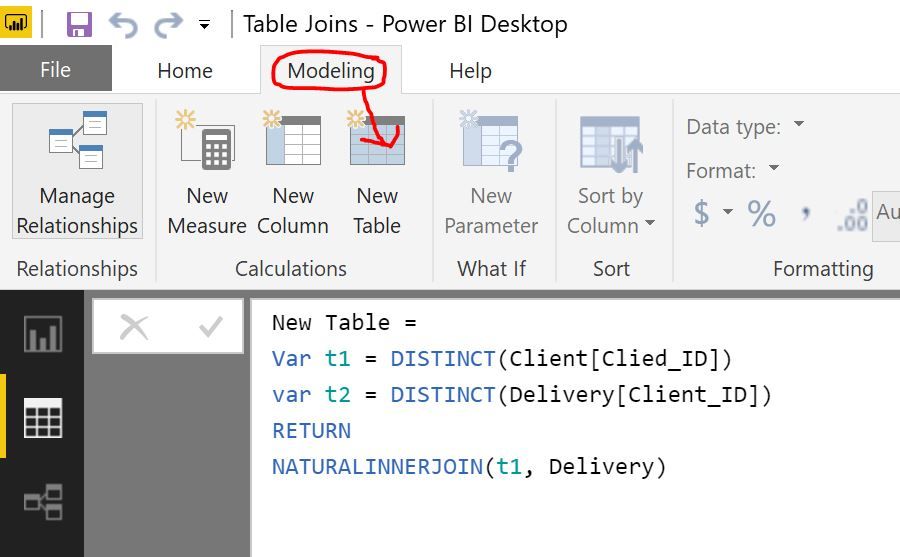
Then create a new table (Modelling -> New Table) using:
New Table =
Var t1 = DISTINCT(Client[Clied_ID])
RETURN
NATURALINNERJOIN(t1, Delivery)
If this solves your problem please mark as the solution.
@Anonymous,
Establisg a 1:many relationship between Clinet and Delivery table using Client ID column.
Then create a new table (Modelling -> New Table) using:
New Table =
Var t1 = DISTINCT(Client[Clied_ID])
RETURN
NATURALINNERJOIN(t1, Delivery)
If this solves your problem please mark as the solution.
| User | Count |
|---|---|
| 23 | |
| 21 | |
| 20 | |
| 20 | |
| 11 |
| User | Count |
|---|---|
| 62 | |
| 55 | |
| 47 | |
| 45 | |
| 35 |