Don't miss your chance to take the Fabric Data Engineer (DP-600) exam for FREE! Find out how by attending the DP-600 session on April 23rd (pacific time), live or on-demand.
Learn moreNext up in the FabCon + SQLCon recap series: The roadmap for Microsoft SQL and Maximizing Developer experiences in Fabric. All sessions are available on-demand after the live show. Register now
Hi
I am new to PBI, and I need to calculate a column, or make a new table where I can see infomration of 2 tables:
I have a table called 'CLIENT 'where existe the column [ID_CLIENT], it has unique data,
and I have a second table called' DELIVERY ', where I have the same column [ID_CLIENT], but in this table I have information from many more customers.
How can I get only the information that is on the 'DELIVERY¨ table, but only the customers of the tabala' CLIENT' only,
How I can remove the second table´s information acording to the clients I have in the first one
Here is an example:
'CLIENT
| ID_CLIENT | IV | FV |
| 102318 | 9:00:00 | 17:00:00 |
| 108439 | 8:00:00 | 16:00:00 |
| 101174 | 8:00:00 | 12:00:00 |
'DELIVERY´
| ID_CLIENT | Delivery Hour |
| 102318 | 10:00 |
| 108439 | 11:00 |
| 101174 | 13:23 |
| 101145 | 12:00 |
| 101243 | 12:00 |
| 102318 | 11:00 |
Create a table only with the info in Bold
Thanks!
Solved! Go to Solution.
@Anonymous,
Establisg a 1:many relationship between Clinet and Delivery table using Client ID column.
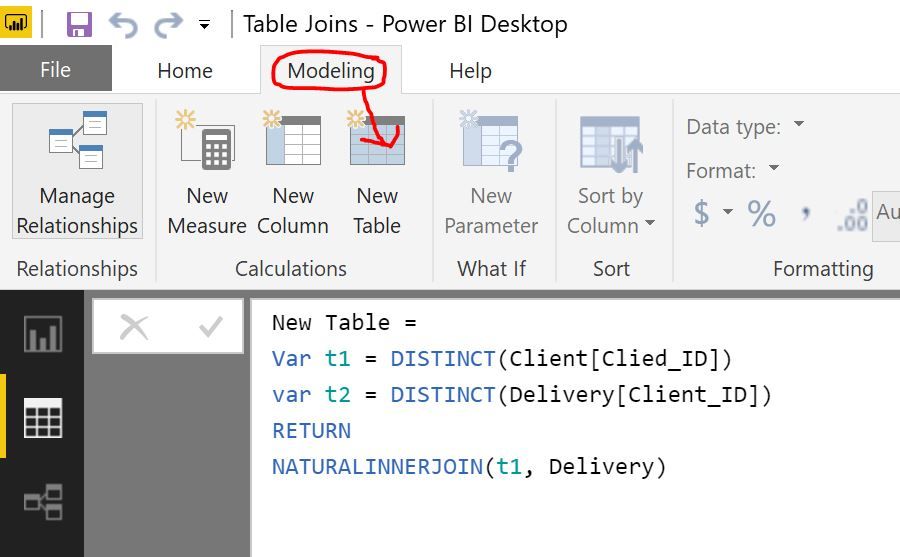
Then create a new table (Modelling -> New Table) using:
New Table =
Var t1 = DISTINCT(Client[Clied_ID])
RETURN
NATURALINNERJOIN(t1, Delivery)
If this solves your problem please mark as the solution.
@Anonymous,
Establisg a 1:many relationship between Clinet and Delivery table using Client ID column.
Then create a new table (Modelling -> New Table) using:
New Table =
Var t1 = DISTINCT(Client[Clied_ID])
RETURN
NATURALINNERJOIN(t1, Delivery)
If this solves your problem please mark as the solution.
If you have recently started exploring Fabric, we'd love to hear how it's going. Your feedback can help with product improvements.
A new Power BI DataViz World Championship is coming this June! Don't miss out on submitting your entry.
Share feedback directly with Fabric product managers, participate in targeted research studies and influence the Fabric roadmap.
| User | Count |
|---|---|
| 48 | |
| 43 | |
| 39 | |
| 19 | |
| 17 |
| User | Count |
|---|---|
| 67 | |
| 63 | |
| 30 | |
| 30 | |
| 23 |