cancel
Showing results for 
Search instead for 
Did you mean: 

We've captured the moments from FabCon & SQLCon that everyone is talking about, and we are bringing them to the community, live and on-demand. Starts on April 14th. Register now

Reply
JPlancke
Frequent Visitor

Summarize Table Header

Hi all,


I am fairly new to Power BI and currently struggling to create a visualization.


The data I am visualizing is about insurances and Risks associated to these insurances. For this we have a Summary table where each unique insurance represents a row. The first column is the unique identifier (insurance number) and the following columns are the risk columns. For each insurance, the risk is flagged via a 1 or 0 (1 = flag set, 0 = no flag) in each risk column. 


I am looking to visualize via:


A bar chart where each value on the X-axis is a risk and the bar itself should represent the number of insurances that have this specific risk. 


But there is a catch to it: If I select a specific insurance (e.g. from a table) I want this bar chart to visualize the specific risks that were flagged for that insurance. So, this has to be visualized based on my Summary Table (not via an intermediary table where the totals for each risk are calculated, since this does not allow me to filter down any further based on an individual (or group of) insurance(s) ).

Refer to the image below for a basic example done in Excel:
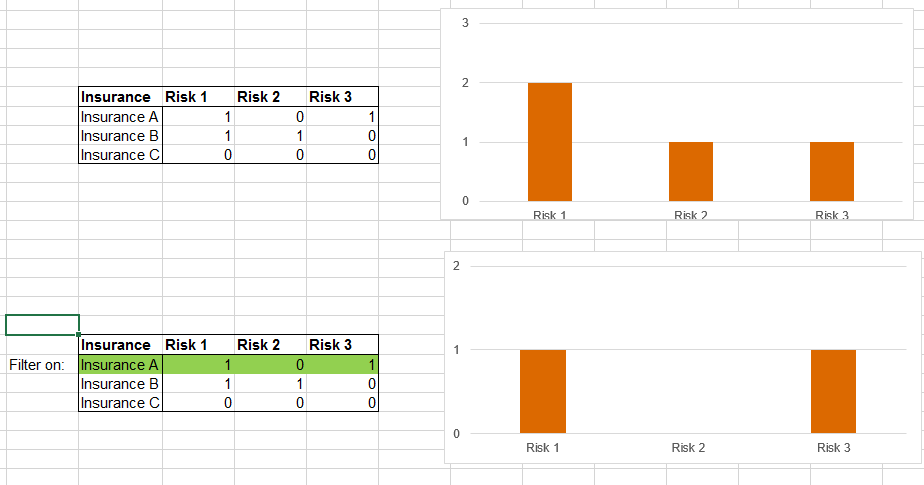
Capture 3.PNG


Thanks a lot in advance guys!

1 ACCEPTED SOLUTION
dilumd
Impactful Individual

Hi


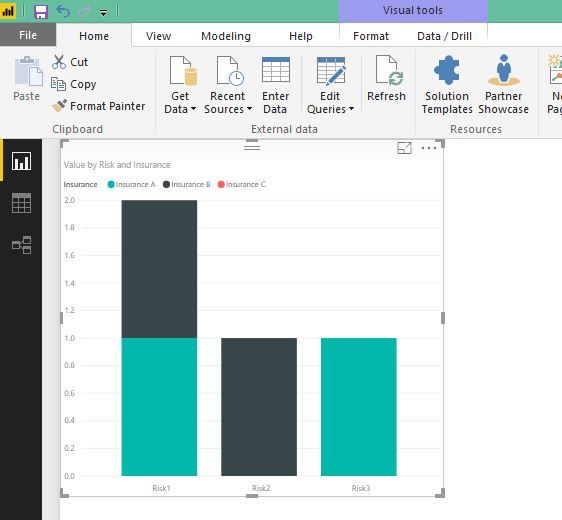
If you are looking for somthing like this,

Insurance.JPG


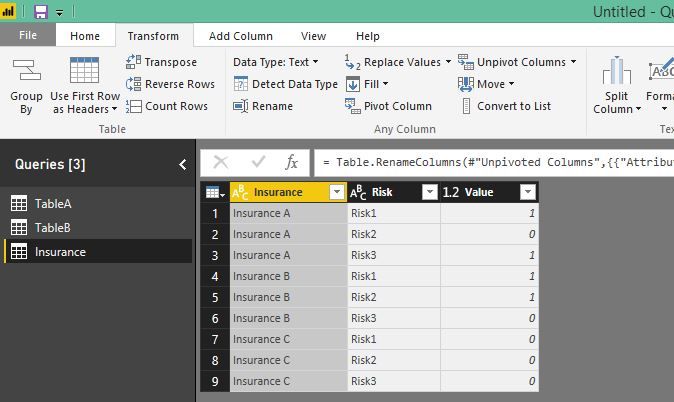
you can use unpivot columns in power query and then use that as a source for this chart.


Unpivot.JPG

View solution in original post

2 REPLIES 2
dilumd
Impactful Individual

Hi


If you are looking for somthing like this,

Insurance.JPG


you can use unpivot columns in power query and then use that as a source for this chart.


Unpivot.JPG

Thanks a lot dilumd!


The problem is indeed solved by pivotting the table and building the visualization based on the new source. 


Yours best,


JP

Helpful resources

Announcements
New to Fabric survey Carousel

New to Fabric Survey

If you have recently started exploring Fabric, we'd love to hear how it's going. Your feedback can help with product improvements.

Power BI DataViz World Championships carousel

Power BI DataViz World Championships - June 2026

A new Power BI DataViz World Championship is coming this June! Don't miss out on submitting your entry.

Join our Fabric User Panel

Join our Fabric User Panel

Share feedback directly with Fabric product managers, participate in targeted research studies and influence the Fabric roadmap.

March Power BI Update Carousel

Power BI Community Update - March 2026

Check out the March 2026 Power BI update to learn about new features.