This is best Fabric, Power BI, SQL and AI community event. How do we know? The last event sold out! Save €200 with code FABCMTY200.
Register nowA new Data Days event is coming soon! This time we’re going bigger than ever. Fabric, Power BI, SQL, AI and more. Don't miss out.
Dear community, this the first time that I'm raising a question, so I hope to post it correctly.
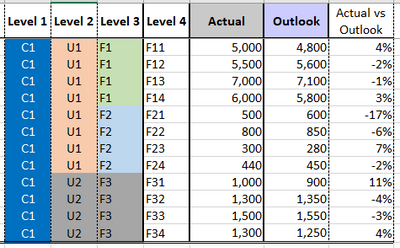
I have a set of data that should be aggregated by different levels (Level 1, Level 2, Level 3).
The column "Actual vs Outlook" is a calculation i.e. Actual divided by Outlook.
The issue that I have is that when I create a visualization that uses "Actual vs Outlook" and I aggregate the figures in the upper levels (Level 1, Level 2, Level 3) I need "Actuals vs Outlook" to be calculated as the sum of Actuals divided by the sum of Outlook.
For example, if I aggregate at level 3, F1 should be calculated as [Actual F11+ Actual F12 + Actual F13 + Actual F14]/[Outlook F11 + Outlook F12 + Outlook F13 + Outlook F14].
Any idea on how to obtain this?
Thanks in advance for your help
Hi @r_marsicovetere ,
You could put the columns in matrix, put levels in Rows field and it will aggregate at row total field.
Best Regards,
Jay
Hello Jay,
thanks for your feedback.
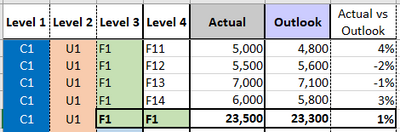
If I got it right,your suggestion is to organize the datas like the following
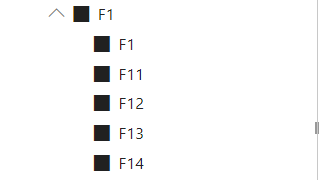
The problem that I have in doing that, is that when I create a slicer to navigate the different level, the correct values for F1 will be shown just selecting F1 in the lower level of the slicer, but this is not correct.
Also, when creating graphs, the drill down and up functions will not show correct figures because aggregating the figures in the wrong way.
Thanks in advance for your help.
BR
Check out the May 2026 Power BI update to learn about new features.
Sign up to receive a private message when registration opens and key events begin.
If you have recently started exploring Fabric, we'd love to hear how it's going. Your feedback can help with product improvements.
| User | Count |
|---|---|
| 30 | |
| 26 | |
| 25 | |
| 22 | |
| 13 |
| User | Count |
|---|---|
| 60 | |
| 50 | |
| 26 | |
| 20 | |
| 19 |