Join us at FabCon Atlanta from March 16 - 20, 2026, for the ultimate Fabric, Power BI, AI and SQL community-led event. Save $200 with code FABCOMM.
Register now!The Power BI Data Visualization World Championships is back! It's time to submit your entry. Live now!
Hi guys,
I have 2 tables:
1. Available Hours across Teams/Roles for Week1 – Week3
| Team | Role | Week1 | Week2 | Week3 |
| Red | A | 40 | 40 | 40 |
| Red | B | 40 | 40 | 40 |
| Red | C | 40 | 40 | 40 |
| Blue | A | 40 | 40 | 40 |
| Blue | D | 40 | 40 | 40 |
2. Required Hours allocation:
| Team | Role | Week1 | Week2 | Week3 |
| Red | A | -20 | -20 | -20 |
| Blue | A | -40 | -40 | -40 |
| Blue | D | -10 | -10 | -10 |
| Green | A | -20 | -20 | -20 |
What I want to get is an Hours Balance table calculated as Available Hours - Required Hours :
| Team | Role | Week1 | Week2 | Week3 |
| Red | A | 20 | 20 | 20 |
| Red | B | 40 | 40 | 40 |
| Red | C | 40 | 40 | 40 |
| Blue | A | 0 | 0 | 0 |
| Blue | D | 30 | 30 | 30 |
| Green | A | -20 | -20 | -20 |
What I did was append these two tables with Available Hours and Required Hours, however, the output table does not summarize calculations and shows each entry as a separate row:
| Team | Role | Week1 | Week2 | Week3 |
| Red | A | 40 | 40 | 40 |
| Red | A | -20 | -20 | -20 |
| Red | B | 40 | 40 | 40 |
| Red | C | 40 | 40 | 40 |
| Blue | A | 40 | 40 | 40 |
| Blue | A | -40 | -40 | -40 |
| Blue | D | 40 | 40 | 40 |
| Blue | D | -10 | -10 | -10 |
| Green | A | -20 | -20 | -20 |
Could you pls help me to get the described desired Hours Balance table.
Thank you! Have a great day!
Solved! Go to Solution.
Hi @Serj ,
Here are the steps you can follow:
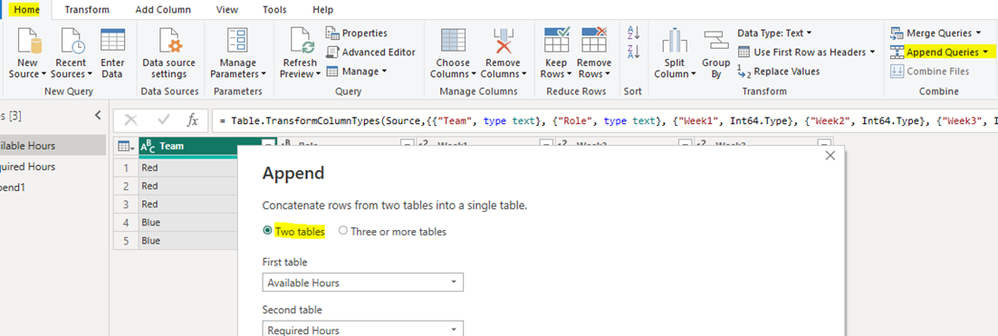
1. In Power Query – Home – Append Queries -- Append Queries as new.
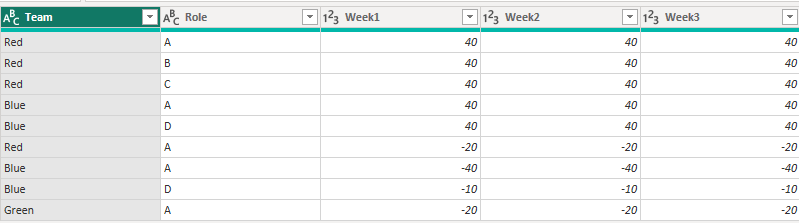
Result:
2. Create calculated table.
True =
SUMMARIZE(
'Append1',
'Append1'[Team],'Append1'[Role], "Week1",SUMX(FILTER(ALL('Append1'),'Append1'[Team]=EARLIER('Append1'[Team])&&'Append1'[Role]=EARLIER('Append1'[Role])),[Week1]), "Week2",SUMX(FILTER(ALL('Append1'),'Append1'[Team]=EARLIER('Append1'[Team])&&'Append1'[Role]=EARLIER('Append1'[Role])),[Week2]), "Week3",SUMX(FILTER(ALL('Append1'),'Append1'[Team]=EARLIER('Append1'[Team])&&'Append1'[Role]=EARLIER('Append1'[Role])),[Week3]))
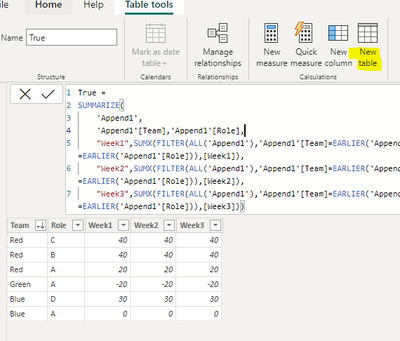
3. Result:
Best Regards,
Liu Yang
If this post helps, then please consider Accept it as the solution to help the other members find it more quickly
Hi @Serj ,
Here are the steps you can follow:
1. In Power Query – Home – Append Queries -- Append Queries as new.
Result:
2. Create calculated table.
True =
SUMMARIZE(
'Append1',
'Append1'[Team],'Append1'[Role], "Week1",SUMX(FILTER(ALL('Append1'),'Append1'[Team]=EARLIER('Append1'[Team])&&'Append1'[Role]=EARLIER('Append1'[Role])),[Week1]), "Week2",SUMX(FILTER(ALL('Append1'),'Append1'[Team]=EARLIER('Append1'[Team])&&'Append1'[Role]=EARLIER('Append1'[Role])),[Week2]), "Week3",SUMX(FILTER(ALL('Append1'),'Append1'[Team]=EARLIER('Append1'[Team])&&'Append1'[Role]=EARLIER('Append1'[Role])),[Week3]))
3. Result:
Best Regards,
Liu Yang
If this post helps, then please consider Accept it as the solution to help the other members find it more quickly
The Power BI Data Visualization World Championships is back! It's time to submit your entry.
Check out the January 2026 Power BI update to learn about new features.
| User | Count |
|---|---|
| 66 | |
| 44 | |
| 34 | |
| 26 | |
| 23 |
| User | Count |
|---|---|
| 137 | |
| 118 | |
| 58 | |
| 40 | |
| 35 |