This time we’re going bigger than ever. Fabric, Power BI, SQL, AI and more. We're covering it all. You won't want to miss it.
Learn moreDid you hear? There's a new SQL AI Developer certification (DP-800). Start preparing now and be one of the first to get certified. Register now
Hi Everyone,
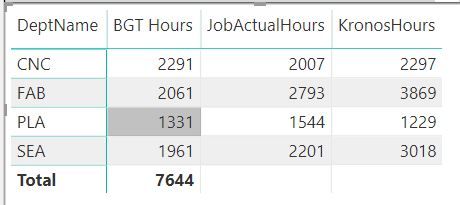
I'm not able to produce a subtotal in my report. Can anyone please help me to fix this?
Formulas I used here are as below:
Password: bi2020
Click the link to get access to the Data File Attachment
DeptName is coming from Budget worksheet from the attachment, I have created a Date field (CalendarAuto) and created date relationship with the three worksheets. I want to see the variance for each Department
Appreicate your help!
Solved! Go to Solution.
Hi , @trulynaveen
You need to do same change in your measures .
Take the measure JobActualHours as a sample:
JobActualHours = SUMX(FILTER('Jobs Data', 'Jobs Data'[NewJobClass] in FILTERS('Budget Data'[DeptName])),('Jobs Data'[JobHours]))
Best Regards,
Community Support Team _ Eason
If this post helps, then please consider Accept it as the solution to help the other members find it more quickly.
@trulynaveen would you mind sharing how you connected your Kronos data? Was it using the REST API an if so how did you do this?
I think your hasonevalues are stopping them . Why those are needed.
https://powerpivotpro.com/2013/03/hasonevalue-vs-isfiltered-vs-hasonefilter/
Refer, if this can help
https://community.powerbi.com/t5/Desktop/Percentage-of-subtotal/td-p/95390
Sorry this is not helpful. Appreciate your response!
Hi , @trulynaveen
You need to do same change in your measures .
Take the measure JobActualHours as a sample:
JobActualHours = SUMX(FILTER('Jobs Data', 'Jobs Data'[NewJobClass] in FILTERS('Budget Data'[DeptName])),('Jobs Data'[JobHours]))
Best Regards,
Community Support Team _ Eason
If this post helps, then please consider Accept it as the solution to help the other members find it more quickly.
Check out the April 2026 Power BI update to learn about new features.
Sign up to receive a private message when registration opens and key events begin.
If you have recently started exploring Fabric, we'd love to hear how it's going. Your feedback can help with product improvements.
| User | Count |
|---|---|
| 36 | |
| 33 | |
| 31 | |
| 21 | |
| 16 |
| User | Count |
|---|---|
| 66 | |
| 55 | |
| 31 | |
| 24 | |
| 23 |