Join us at FabCon Atlanta from March 16 - 20, 2026, for the ultimate Fabric, Power BI, AI and SQL community-led event. Save $200 with code FABCOMM.
Register now!The Power BI Data Visualization World Championships is back! It's time to submit your entry. Live now!
Hi Everyone,
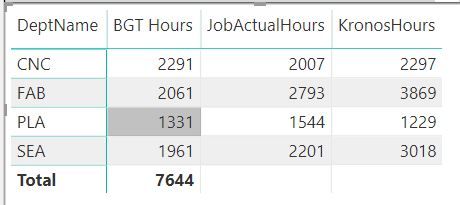
I'm not able to produce a subtotal in my report. Can anyone please help me to fix this?
Formulas I used here are as below:
Password: bi2020
Click the link to get access to the Data File Attachment
DeptName is coming from Budget worksheet from the attachment, I have created a Date field (CalendarAuto) and created date relationship with the three worksheets. I want to see the variance for each Department
Appreicate your help!
Solved! Go to Solution.
Hi , @trulynaveen
You need to do same change in your measures .
Take the measure JobActualHours as a sample:
JobActualHours = SUMX(FILTER('Jobs Data', 'Jobs Data'[NewJobClass] in FILTERS('Budget Data'[DeptName])),('Jobs Data'[JobHours]))
Best Regards,
Community Support Team _ Eason
If this post helps, then please consider Accept it as the solution to help the other members find it more quickly.
@trulynaveen would you mind sharing how you connected your Kronos data? Was it using the REST API an if so how did you do this?
I think your hasonevalues are stopping them . Why those are needed.
https://powerpivotpro.com/2013/03/hasonevalue-vs-isfiltered-vs-hasonefilter/
Refer, if this can help
https://community.powerbi.com/t5/Desktop/Percentage-of-subtotal/td-p/95390
Sorry this is not helpful. Appreciate your response!
Hi , @trulynaveen
You need to do same change in your measures .
Take the measure JobActualHours as a sample:
JobActualHours = SUMX(FILTER('Jobs Data', 'Jobs Data'[NewJobClass] in FILTERS('Budget Data'[DeptName])),('Jobs Data'[JobHours]))
Best Regards,
Community Support Team _ Eason
If this post helps, then please consider Accept it as the solution to help the other members find it more quickly.
| User | Count |
|---|---|
| 53 | |
| 40 | |
| 35 | |
| 24 | |
| 22 |
| User | Count |
|---|---|
| 134 | |
| 108 | |
| 57 | |
| 43 | |
| 38 |