
This time we’re going bigger than ever. Fabric, Power BI, SQL, AI and more. We're covering it all. You won't want to miss it.
Learn moreLevel up your Power BI skills this month - build one visual each week and tell better stories with data! Get started
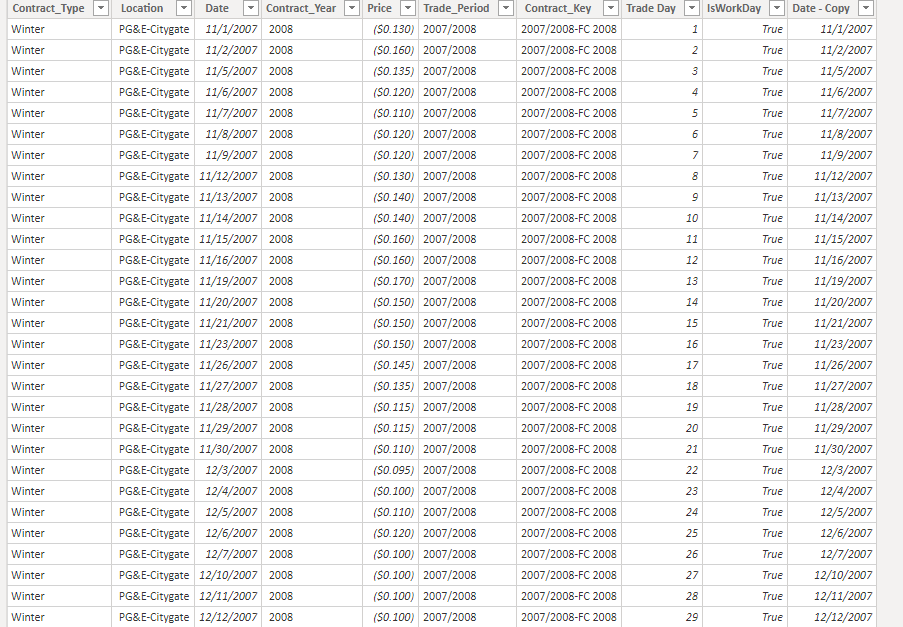
I have a table (See below) with prices for different years
I have 250 Trade Days in each contract period from 11/01 to 10/31 each year.
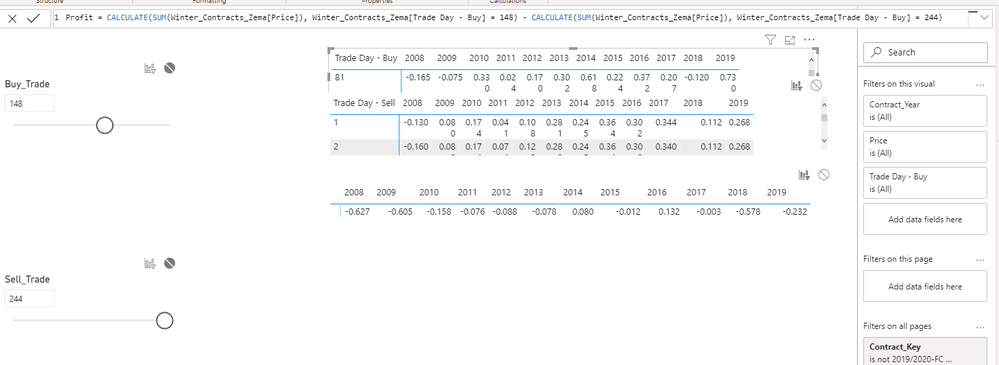
I need to dynamically select (what if) table or similar a buy and sell Trade day and calculate the profit for each contract year if i were to buy and sell on those days. See below
In date: Day of trade
Out Date Day of trade
I need a measure that will substract the price from my in trade day to my out trade day. How can I do that?
Solved! Go to Solution.
Hi @Anonymous ,
Please try to update the formula of your measure "Profit" just like below(the red font part is newly add):
| Profit = CALCULATE ( SUM ( Winter_Contracts_Zema[Price] ), FILTER ( ALL ( Winter_Contracts_Zema[Trade Day - Buy] ), Winter_Contracts_Zema[Trade Day - Buy] = [Buy_Trade Value] ) ) - CALCULATE ( SUM ( Winter_Contracts_Zema[Price] ), FILTER ( ALL ( Winter_Contracts_Zema[Trade Day - Buy] ), Winter_Contracts_Zema[Trade Day - Buy] = [Sell_Trade Value] ) ) |
Best Regards
Rena
I solved it by using the value function in my measure! thanks to everyone who took the time to read this!
I created this measure
Hi @Anonymous ,
Please try to update the formula of your measure "Profit" just like below(the red font part is newly add):
| Profit = CALCULATE ( SUM ( Winter_Contracts_Zema[Price] ), FILTER ( ALL ( Winter_Contracts_Zema[Trade Day - Buy] ), Winter_Contracts_Zema[Trade Day - Buy] = [Buy_Trade Value] ) ) - CALCULATE ( SUM ( Winter_Contracts_Zema[Price] ), FILTER ( ALL ( Winter_Contracts_Zema[Trade Day - Buy] ), Winter_Contracts_Zema[Trade Day - Buy] = [Sell_Trade Value] ) ) |
Best Regards
Rena
Thank you!! my profit measure is now working!
This is probably very simple, as it is in excel but I cant figure it out in Power Bi
I need to count the number of times my profit measure gave > 0 results.
=COUNTIF(Profit>0")
But i get an error in power Bi as it doesnt accept a measure as a filter. Any ideas? Im stuck in something so simple.
I also tried Calculate(Count(Winter_Contracts_Year)), [profit] > 0)
I highly appreciate the best practice here.
From my
I solved it by using the value function in my measure! thanks to everyone who took the time to read this!
Check out the April 2026 Power BI update to learn about new features.
Sign up to receive a private message when registration opens and key events begin.
If you have recently started exploring Fabric, we'd love to hear how it's going. Your feedback can help with product improvements.
| User | Count |
|---|---|
| 36 | |
| 29 | |
| 29 | |
| 21 | |
| 18 |
| User | Count |
|---|---|
| 70 | |
| 40 | |
| 33 | |
| 24 | |
| 23 |