
Join us at FabCon Atlanta from March 16 - 20, 2026, for the ultimate Fabric, Power BI, AI and SQL community-led event. Save $200 with code FABCOMM.
Register now!The Power BI Data Visualization World Championships is back! It's time to submit your entry. Live now!
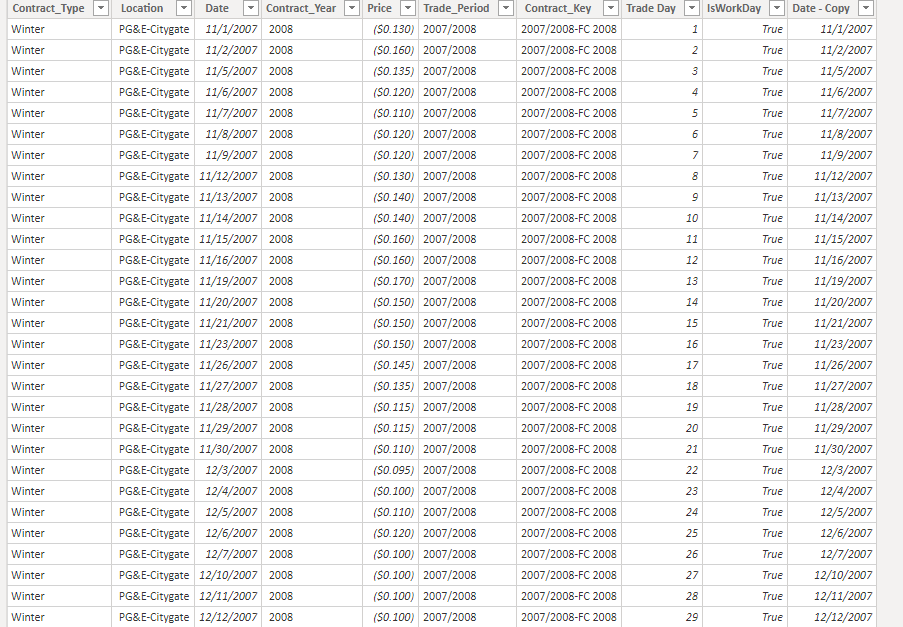
I have a table (See below) with prices for different years
I have 250 Trade Days in each contract period from 11/01 to 10/31 each year.
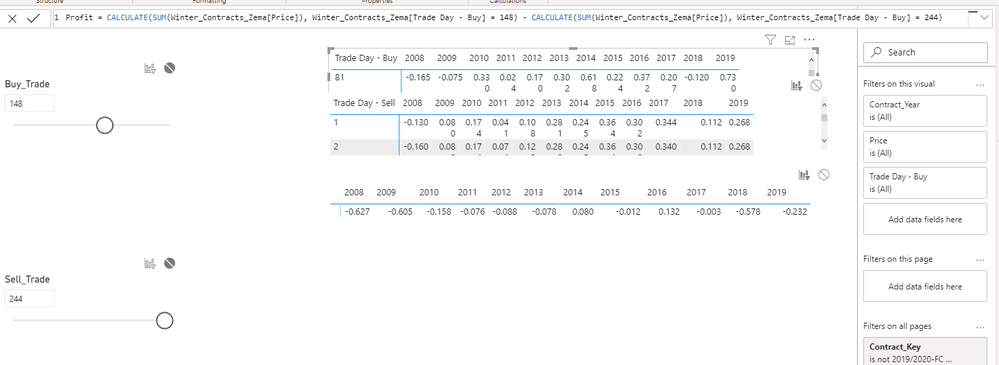
I need to dynamically select (what if) table or similar a buy and sell Trade day and calculate the profit for each contract year if i were to buy and sell on those days. See below
In date: Day of trade
Out Date Day of trade
I need a measure that will substract the price from my in trade day to my out trade day. How can I do that?
Solved! Go to Solution.
Hi @Anonymous ,
Please try to update the formula of your measure "Profit" just like below(the red font part is newly add):
| Profit = CALCULATE ( SUM ( Winter_Contracts_Zema[Price] ), FILTER ( ALL ( Winter_Contracts_Zema[Trade Day - Buy] ), Winter_Contracts_Zema[Trade Day - Buy] = [Buy_Trade Value] ) ) - CALCULATE ( SUM ( Winter_Contracts_Zema[Price] ), FILTER ( ALL ( Winter_Contracts_Zema[Trade Day - Buy] ), Winter_Contracts_Zema[Trade Day - Buy] = [Sell_Trade Value] ) ) |
Best Regards
Rena
I solved it by using the value function in my measure! thanks to everyone who took the time to read this!
I created this measure
Hi @Anonymous ,
Please try to update the formula of your measure "Profit" just like below(the red font part is newly add):
| Profit = CALCULATE ( SUM ( Winter_Contracts_Zema[Price] ), FILTER ( ALL ( Winter_Contracts_Zema[Trade Day - Buy] ), Winter_Contracts_Zema[Trade Day - Buy] = [Buy_Trade Value] ) ) - CALCULATE ( SUM ( Winter_Contracts_Zema[Price] ), FILTER ( ALL ( Winter_Contracts_Zema[Trade Day - Buy] ), Winter_Contracts_Zema[Trade Day - Buy] = [Sell_Trade Value] ) ) |
Best Regards
Rena
Thank you!! my profit measure is now working!
This is probably very simple, as it is in excel but I cant figure it out in Power Bi
I need to count the number of times my profit measure gave > 0 results.
=COUNTIF(Profit>0")
But i get an error in power Bi as it doesnt accept a measure as a filter. Any ideas? Im stuck in something so simple.
I also tried Calculate(Count(Winter_Contracts_Year)), [profit] > 0)
I highly appreciate the best practice here.
From my
I solved it by using the value function in my measure! thanks to everyone who took the time to read this!
| User | Count |
|---|---|
| 56 | |
| 41 | |
| 38 | |
| 21 | |
| 21 |
| User | Count |
|---|---|
| 140 | |
| 102 | |
| 64 | |
| 36 | |
| 35 |