Get certified for free when you join Fabric Data Days 2026 and dive into Fabric, Power BI, SQL, AI, and other essential data skills.
Join nowTry your skills in the Power BI Dataviz World Championship! Round one ends June 26. Join now
Hello,
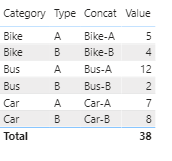
I need some help guys,i have this main table :
I need to substract (Bike-A)- (Bike-B) if the result is negative so we display Category which is Bike,Bus,Car, i'll write you an exp :
(Bike-A)- (Bike-B)=1 (Ok)
(Bus-A)- (Bus-B)=10 (Ok)
(Car-A)- (Car-B)=-1<0 so we display the category (Car)
what i did i concate category and type as shown below :
i tried several formula but i didn't get the right result,any help please ?
what i need is : if([Bike-A] - [Bike-B]<0 then Bike and the same for other.
Thank you 🙂
Solved! Go to Solution.
Hi, @FZOU
It’s my pleasure to answer for you.
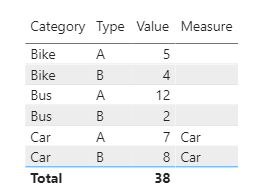
According to your description, I think you can create a measure to calculate the correct result.
Like this:
Measure =
VAR a =
MAXX (
FILTER (
ALL ( Table2 ),
Table2[Type] <> SELECTEDVALUE ( Table2[Type] )
&& Table2[Category] = SELECTEDVALUE ( Table2[Category] )
),
[Value]
)
RETURN
IF (
SELECTEDVALUE ( Table2[Type] ) = "A"
&& SELECTEDVALUE ( Table2[Value] ) - a < 0
|| SELECTEDVALUE ( Table2[Type] ) = "B"
&& SELECTEDVALUE ( Table2[Value] ) - a > 0,
SELECTEDVALUE ( Table2[Category] )
)If it doesn’t solve your problem, please feel free to ask me.
Best Regards
Janey Guo
If this post helps, then please consider Accept it as the solution to help the other members find it more quickly.
Hi, @FZOU
It’s my pleasure to answer for you.
According to your description, I think you can create a measure to calculate the correct result.
Like this:
Measure =
VAR a =
MAXX (
FILTER (
ALL ( Table2 ),
Table2[Type] <> SELECTEDVALUE ( Table2[Type] )
&& Table2[Category] = SELECTEDVALUE ( Table2[Category] )
),
[Value]
)
RETURN
IF (
SELECTEDVALUE ( Table2[Type] ) = "A"
&& SELECTEDVALUE ( Table2[Value] ) - a < 0
|| SELECTEDVALUE ( Table2[Type] ) = "B"
&& SELECTEDVALUE ( Table2[Value] ) - a > 0,
SELECTEDVALUE ( Table2[Category] )
)If it doesn’t solve your problem, please feel free to ask me.
Best Regards
Janey Guo
If this post helps, then please consider Accept it as the solution to help the other members find it more quickly.
Believe this post is duplicated with the one below:
https://community.powerbi.com/t5/Desktop/Substract-two-rows/m-p/1442043#M605621
Regards
Miguel Félix
Proud to be a Super User!
Check out my blog: Power BI em PortuguêsDon't miss out on Data Days, June 15 through August 7. Learn Fabric, Power BI, SQL, AI and more.
Check out the May 2026 Power BI update to learn about new features.
| User | Count |
|---|---|
| 22 | |
| 21 | |
| 21 | |
| 20 | |
| 13 |
| User | Count |
|---|---|
| 59 | |
| 53 | |
| 40 | |
| 31 | |
| 26 |