Join us in Barcelona for FabCon and SQLCon, September 28 - October 1, 2026.
This is best Fabric, Power BI, SQL and AI community event. How do we know? The last event sold out! Save €200 with code FABCMTY200.
Register now- Power BI forums
- Get Help with Power BI
- Desktop
- Service
- Report Server
- Power Query
- Mobile Apps
- Developer
- DAX Commands and Tips
- Custom Visuals Development Discussion
- Health and Life Sciences
- Power BI Spanish forums
- Translated Spanish Desktop
- Training and Consulting
- Instructor Led Training
- Dashboard in a Day for Women, by Women
- Galleries
- Data Stories Gallery
- Themes Gallery
- Contests Gallery
- QuickViz Gallery
- Quick Measures Gallery
- Visual Calculations Gallery
- Fabric Apps Gallery
- Notebook Gallery
- Translytical Task Flow Gallery
- TMDL Gallery
- R Script Showcase
- Webinars and Video Gallery
- Ideas
- Custom Visuals Ideas (read-only)
- Issues
- Issues
- Events
- Upcoming Events
The Fabric community is upgrading! Read all of the details including the timeline and what you can expect. Learn more
- Power BI forums
- Forums
- Get Help with Power BI
- Desktop
- Re: String Extract based on criteria
- Subscribe to RSS Feed
- Mark Topic as New
- Mark Topic as Read
- Float this Topic for Current User
- Bookmark
- Subscribe
- Printer Friendly Page

- Mark as New
- Bookmark
- Subscribe
- Mute
- Subscribe to RSS Feed
- Permalink
- Report Inappropriate Content
String Extract based on criteria
I have a table and one column contains free text. I'm looking to add a column which will search the free text and extract anything which has a letter followed by 5 numbers.
For example - the below would be extracted:
D98765
d12345
D 54821
d 65411
This could be anywhere within the string of text. Is this possible?
Solved! Go to Solution.


- Mark as New
- Bookmark
- Subscribe
- Mute
- Subscribe to RSS Feed
- Permalink
- Report Inappropriate Content
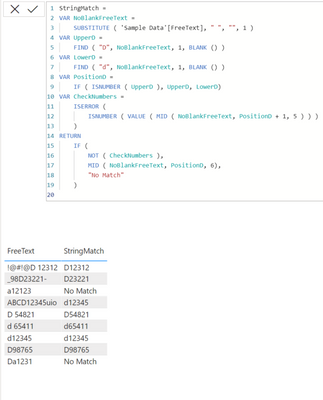
@mwild ***Made a tweak to the code***
The following works. I will let you tweak the code further if you need to so I am not doing all your homework 😂
StringMatch =
VAR NoBlankFreeText =
    SUBSTITUTE ( 'Sample Data'[FreeText], " ", "", 1 )
VAR UpperD =
    FIND ( "D", NoBlankFreeText, 1, BLANK () )
VAR LowerD =
    FIND ( "d", NoBlankFreeText, 1, BLANK () )
VAR PositionD =
    IF ( ISNUMBER ( UpperD ), UpperD, LowerD)
VAR CheckNumbers =
    ISERROR (
        ISNUMBER ( VALUE ( MID ( NoBlankFreeText, PositionD + 1, 5 ) ) )
    )
RETURN
    IF (
        NOT ( CheckNumbers ),
        MID ( NoBlankFreeText, PositionD, 6),
        "No Match"
    )
Moiz
Was I able to answer your question? Mark my post as a solution to help others. Kudos if you liked the solution.


- Mark as New
- Bookmark
- Subscribe
- Mute
- Subscribe to RSS Feed
- Permalink
- Report Inappropriate Content
With combination of LEFT or RIGHT function
✔ Answered? Mark as solution
Muhammad Hasnain | Super User • Fabric • Power BI • Data Engineering
Let's connect on LinkedIn
- Mark as New
- Bookmark
- Subscribe
- Mute
- Subscribe to RSS Feed
- Permalink
- Report Inappropriate Content
Or you can use CONTAINSSTRING function e.g
MyCalculatedColumn = If(CONTAINSSTRING([TARGETCOLUMN];"searchforthis");TRUE();FALSE())
✔ Answered? Mark as solution
Muhammad Hasnain | Super User • Fabric • Power BI • Data Engineering
Let's connect on LinkedIn
- Mark as New
- Bookmark
- Subscribe
- Mute
- Subscribe to RSS Feed
- Permalink
- Report Inappropriate Content
I am not sure how this will work when the end goal is "any letter followed by any numbers" when the letter and the numbers could be anything, e.g. it can be "Z 98765" or "b34561" or worse "!@#@!D48202@#!@".
Moiz
Was I able to answer your question? Mark my post as a solution to help others. Kudos if you liked the solution.
- Mark as New
- Bookmark
- Subscribe
- Mute
- Subscribe to RSS Feed
- Permalink
- Report Inappropriate Content
The letter will always be "D" or "d"
There may be a space (or may not be) and then 5 numbers between 0 and 9
- Mark as New
- Bookmark
- Subscribe
- Mute
- Subscribe to RSS Feed
- Permalink
- Report Inappropriate Content
@mwild ***Made a tweak to the code***
The following works. I will let you tweak the code further if you need to so I am not doing all your homework 😂
StringMatch =
VAR NoBlankFreeText =
    SUBSTITUTE ( 'Sample Data'[FreeText], " ", "", 1 )
VAR UpperD =
    FIND ( "D", NoBlankFreeText, 1, BLANK () )
VAR LowerD =
    FIND ( "d", NoBlankFreeText, 1, BLANK () )
VAR PositionD =
    IF ( ISNUMBER ( UpperD ), UpperD, LowerD)
VAR CheckNumbers =
    ISERROR (
        ISNUMBER ( VALUE ( MID ( NoBlankFreeText, PositionD + 1, 5 ) ) )
    )
RETURN
    IF (
        NOT ( CheckNumbers ),
        MID ( NoBlankFreeText, PositionD, 6),
        "No Match"
    )
Moiz
Was I able to answer your question? Mark my post as a solution to help others. Kudos if you liked the solution.
- Mark as New
- Bookmark
- Subscribe
- Mute
- Subscribe to RSS Feed
- Permalink
- Report Inappropriate Content
You can use CONTAIN function
✔ Answered? Mark as solution
Muhammad Hasnain | Super User • Fabric • Power BI • Data Engineering
Let's connect on LinkedIn
- Mark as New
- Bookmark
- Subscribe
- Mute
- Subscribe to RSS Feed
- Permalink
- Report Inappropriate Content
You can do this using regular expression (using R or Python) in the query editor, Curbal here explains it really well
https://www.youtube.com/watch?v=9E3VsvFAge4
Regards,
Moiz
If this post helps, please "Accept" it as Solution to help other members find it.
Moiz
Was I able to answer your question? Mark my post as a solution to help others. Kudos if you liked the solution.

Helpful resources

FabCon & SQLCon – Barcelona 2026
Join us in Barcelona for FabCon and SQLCon, the Fabric, Power BI, SQL, and AI community event. Save €200 with code FABCMTY200.

Power BI DataViz World Championships - June 2026
A new Power BI DataViz World Championship is coming this June! Don't miss out on submitting your entry.

| User | Count |
|---|---|
| 24 | |
| 22 | |
| 19 | |
| 17 | |
| 14 |


| User | Count |
|---|---|
| 32 | |
| 28 | |
| 23 | |
| 20 | |
| 20 |


