cancel
Showing results for 
Search instead for 
Did you mean: 

Vote for your favorite vizzies from the Power BI Dataviz World Championship submissions. Vote now!

Reply
eagletro
Frequent Visitor

Stock Movement graph

Hi,


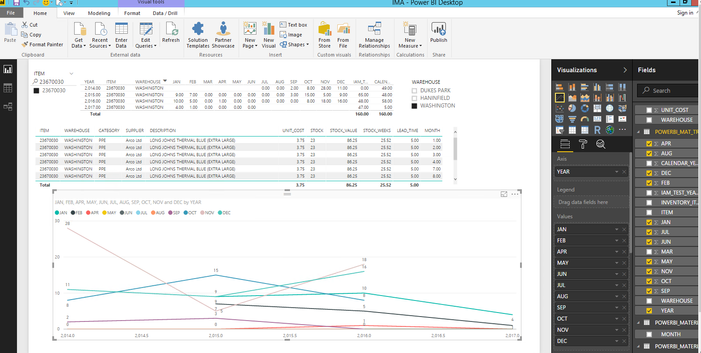
i am trying to graph the below. i  just want each year as a line showing the values for the item number 23670030 by month.

data graph.PNG

i can achieve the below in excel.. each series is a year.. sorry rushed it 🙂

graphexcel.png


but the best i can achieve in power bi so far is..


graph.PNG


any help will greatly appreciated.


Robert

1 ACCEPTED SOLUTION
v-ljerr-msft
Microsoft Employee
Microsoft Employee

Hi @eagletro,


According to your description above, you may need to use Unpivot option under Query Editor > Transform to unpivot your "JAN", "FEB" ... "DEC" columns to a column with all months, and a column with all values of each month. 


Then you should be able to use the unpivoted Month column as Axis, the YEAR column as Legend, and the Value column as Values on the Line chart to get your expected result.


For more details about how use Unpivot option with Power BI, you can refer to this article. Smiley Happy


Regards

View solution in original post

2 REPLIES 2
v-ljerr-msft
Microsoft Employee
Microsoft Employee

Hi @eagletro,


According to your description above, you may need to use Unpivot option under Query Editor > Transform to unpivot your "JAN", "FEB" ... "DEC" columns to a column with all months, and a column with all values of each month. 


Then you should be able to use the unpivoted Month column as Axis, the YEAR column as Legend, and the Value column as Values on the Line chart to get your expected result.


For more details about how use Unpivot option with Power BI, you can refer to this article. Smiley Happy


Regards

prakash_gautam
Resolver II
Resolver II

Hello,


What about Year in Legend, Month in Axis and the measure in Values as in the following screen:


line-graph.png

Thanks,

Helpful resources

Announcements
Power BI DataViz World Championships

Power BI Dataviz World Championships

Vote for your favorite vizzies from the Power BI World Championship submissions!

Sticker Challenge 2026 Carousel

Join our Community Sticker Challenge 2026

If you love stickers, then you will definitely want to check out our Community Sticker Challenge!

January Power BI Update Carousel

Power BI Monthly Update - January 2026

Check out the January 2026 Power BI update to learn about new features.

FabCon Atlanta 2026 carousel

FabCon Atlanta 2026

Join us at FabCon Atlanta, March 16-20, for the ultimate Fabric, Power BI, AI and SQL community-led event. Save $200 with code FABCOMM.