cancel
Showing results for 
Search instead for 
Did you mean: 

The Power BI Data Visualization World Championships is back! Get ahead of the game and start preparing now! Learn more

Reply
Anonymous
Not applicable

Stacked Product Count

Hi Everyone,

I have been trying to figure this out but am getting nowhere. I have a dataset with customers and the products each customer is using. What I need is for get a count of what customer is using which product?

Ex.  Dataset has 5 Customers - Customer A is using products 1 and 2, Customer B is using products 2, 4, 5, Customer C is using products 1, 3, 4, 5, Customer D is using product 1, Customer E is using product 1, 2, 4, 5.


I want to be able to show how many customers are using one product, two products, 3 products, etc.


Any suggestion would be greatly appreciated. 

1 ACCEPTED SOLUTION

Hi, @Anonymous 


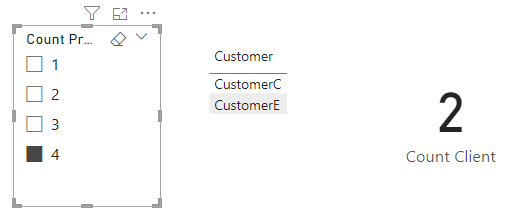
Measure can't make slicers, Column can. You can try the following methods.


Count Product = CALCULATE(DISTINCTCOUNT('Table'[Product]),ALLEXCEPT('Table','Table'[Customer]))


vzhangti_0-1679366878560.png

Measure:


Count Client = CALCULATE(DISTINCTCOUNT('Table'[Customer]),ALLEXCEPT('Table','Table'[Count Product]))


vzhangti_1-1679367026485.png

vzhangti_2-1679367053720.png

Is this the result you expect?


Best Regards,

Community Support Team _Charlotte

If this post helps, then please consider Accept it as the solution to help the other members find it more quickly.

View solution in original post

5 REPLIES 5
Ahmedx
Super User
Super User


Count= DISTINCTCOUNT('table'[product])& "-"& calculate(DISTINCTCOUNT('table'[product]),allselect(client))


Anonymous
Not applicable

After creating the measure, I was able to get the number of products each client is using!


Is there a way to add a slicer for this? If I click 2, it'll show me how many clients are using 2 products? If I click 4, it'll show me how many clients are using 4 products?

Hi, @Anonymous 


Measure can't make slicers, Column can. You can try the following methods.


Count Product = CALCULATE(DISTINCTCOUNT('Table'[Product]),ALLEXCEPT('Table','Table'[Customer]))


vzhangti_0-1679366878560.png

Measure:


Count Client = CALCULATE(DISTINCTCOUNT('Table'[Customer]),ALLEXCEPT('Table','Table'[Count Product]))


vzhangti_1-1679367026485.png

vzhangti_2-1679367053720.png

Is this the result you expect?


Best Regards,

Community Support Team _Charlotte

If this post helps, then please consider Accept it as the solution to help the other members find it more quickly.

Anonymous
Not applicable

I am able to get the disticnt count of product, which is 5; however, what I need is of the 5 products, how many is each customer using?

Customer A is using 3 of 5

Customer B is using 2 of 5

Customer C is using 1 of 5

Customer D is using 4 of 5


How do I get this measure?

Ahmedx
Super User
Super User

1) product column insert into rows
2) write down the measure as follows:

Count= DISTINCTCOUNT('Таблица'[Клиенты]) 

Helpful resources

Announcements
Power BI DataViz World Championships

Power BI Dataviz World Championships

The Power BI Data Visualization World Championships is back! Get ahead of the game and start preparing now!

December 2025 Power BI Update Carousel

Power BI Monthly Update - December 2025

Check out the December 2025 Power BI Holiday Recap!

FabCon Atlanta 2026 carousel

FabCon Atlanta 2026

Join us at FabCon Atlanta, March 16-20, for the ultimate Fabric, Power BI, AI and SQL community-led event. Save $200 with code FABCOMM.