cancel
Showing results for 
Search instead for 
Did you mean: 

July 28 - August 9 | Final Round of the Power BI Dataviz World Championships. This is your chance. Learn more

Reply
vickyd
Helper V
Helper V

Stacked Area Chart - Data Label position

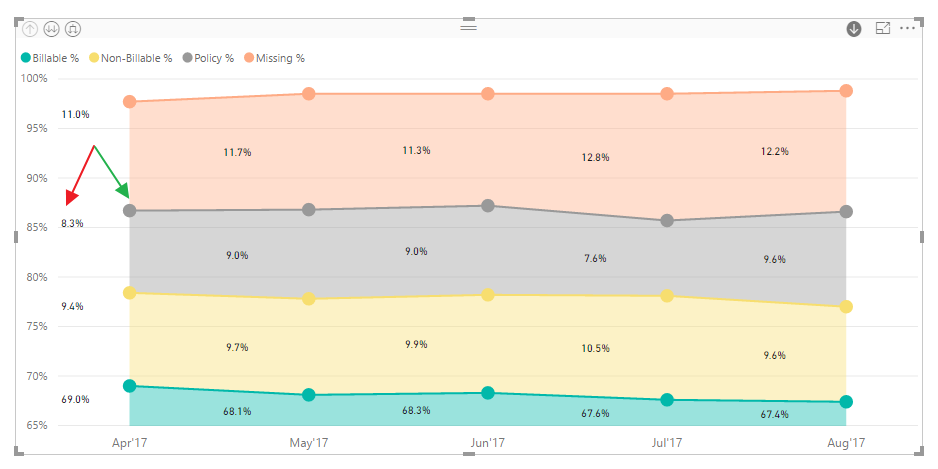
Why are the data labels in a stacked area shown the way they are i.e. in between the points rather than on the points and is there any way to change it?

Area Chart.png

1 ACCEPTED SOLUTION

Same thing was happening to me.  The X-Axis has to be a number not text, for you to change it to Continuous.

This worked for me.


My last issues is with the Tooltip menu that pops up.  It shows ALL of the values in Legend, not just the one I currently have my mouse hoovered over.  


It seems like they have all of these visuals done just good enought to push them out the door.  They just need a little more TLC, then they would shine.

View solution in original post

6 REPLIES 6
v-huizhn-msft
Microsoft Employee
Microsoft Employee

Hi @vickyd,

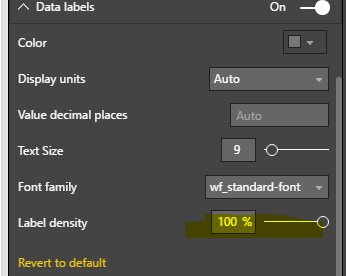
Please set your X-Axis as Continuous type, and set Label density under Data Lebals as 100%, please see the highlighted items in yellow background. And check if it works fine.

1.PNG2.PNG

Best Regards,
Angelia

@v-huizhn-msft It's not allowing me to switch to Continuous. Every time I try changing it, it switches back to Categorical. 

With a normal area chart the labels appear fine even though that doesn't allow me to change to Continuous either.

Label issue however seems to be only with a stacked area chart. 

Same thing was happening to me.  The X-Axis has to be a number not text, for you to change it to Continuous.

This worked for me.


My last issues is with the Tooltip menu that pops up.  It shows ALL of the values in Legend, not just the one I currently have my mouse hoovered over.  


It seems like they have all of these visuals done just good enought to push them out the door.  They just need a little more TLC, then they would shine.

Hi @vickyd,

Do you mind share your .pbix file for further analysis? If your data is confidential, you can share it by private message.

Best Regards,
Angelia

@v-huizhn-msft It's actually tied to a SSAS DB live connection. I'll try to use import data option and seen if I can replicate and share. 

One more detail I forgot to mention is that I am using Power BI Desktop for Report Server although I doubt that's an issue. 

Hi @vickyd,

Please post your thread to dedicated forum because you use Power BI Desktop for Report Server.

Best Regards,
Angelia

Helpful resources

Announcements
FabCon and SQLCon Barcelona 2026

FabCon & SQLCon – Barcelona 2026

Join us in Barcelona for FabCon and SQLCon, the Fabric, Power BI, SQL, and AI community event. Save €200 with code FABCMTY200.

Fabric Community Sticker Design Challenge Barcelona Carousel

Fabric Community Sticker Challenge - Barcelona 2026

If you love stickers, then you will definitely want to check out our community sticker challenge, Barcelona edition!

July Power BI Update Carousel

Power BI Monthly Update - July 2026

Check out the July 2026 Power BI update to learn about new features.

Power BI DataViz World Championships carousel

Power BI DataViz World Championships - June 2026

A new Power BI DataViz World Championship is coming this June! Don't miss out on submitting your entry.