Don't miss your chance to take the Fabric Data Engineer (DP-600) exam for FREE! Find out how by attending the DP-600 session on April 23rd (pacific time), live or on-demand.
Learn moreNext up in the FabCon + SQLCon recap series: The roadmap for Microsoft SQL and Maximizing Developer experiences in Fabric. All sessions are available on-demand after the live show. Register now
Hi everyone,
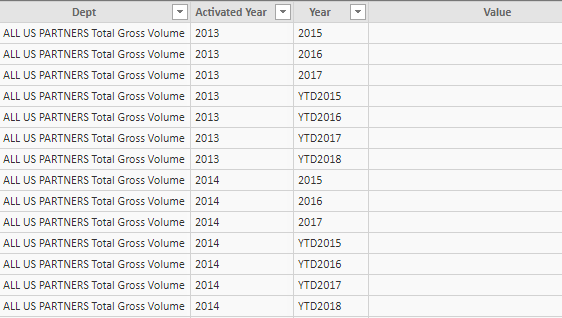
I need to create 2 different charts based on the following table (on with the year and one with YTD).
In the document it is from, year and YTD are mixed together ... Is there any way I can have a table with the year and another with YTD (and the dept, associated year and value attached to it) ?
And, if someone makes changes in the original document, is it going to refresh afterwards when neeeded ?
Thanks for the help,
Solved! Go to Solution.
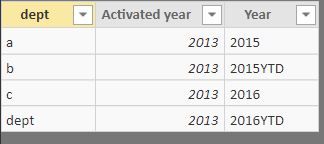
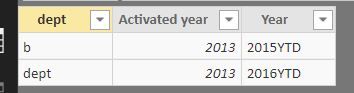
I will create two tables for this. Please check if this can meet your requirements. Thanks
TABLE2 = FILTER('Sheet27',SEARCH("YTD",'Sheet27'[Year],1,0)=0)
TABLE3 = FILTER('Sheet27',SEARCH("YTD",'Sheet27'[Year],1,0)>0)
Proud to be a Super User!
I will create two tables for this. Please check if this can meet your requirements. Thanks
TABLE2 = FILTER('Sheet27',SEARCH("YTD",'Sheet27'[Year],1,0)=0)
TABLE3 = FILTER('Sheet27',SEARCH("YTD",'Sheet27'[Year],1,0)>0)
Proud to be a Super User!
That's exactly what I need
Though I get this message when I try to split in 2 different tables :
Any idea why ?
Thanks a lot,
Are you creating a new table or new measure? This coding has to be used when you creating a new table.
Thanks
Proud to be a Super User!
Hi @NB3,
I think you are use these formula in calculated column, right? if this is a case, ryan_mayu's formula are calculated table formulas, please click on 'new table' icon to create new table to use his formulas.
Regards,
Xiaoxin Sheng
If you have recently started exploring Fabric, we'd love to hear how it's going. Your feedback can help with product improvements.
A new Power BI DataViz World Championship is coming this June! Don't miss out on submitting your entry.
Share feedback directly with Fabric product managers, participate in targeted research studies and influence the Fabric roadmap.
| User | Count |
|---|---|
| 44 | |
| 43 | |
| 38 | |
| 18 | |
| 16 |
| User | Count |
|---|---|
| 67 | |
| 63 | |
| 30 | |
| 30 | |
| 23 |