Share feedback directly with Fabric product managers, participate in targeted research studies and influence the Fabric roadmap.
Sign up nowGet Fabric certified for FREE! Don't miss your chance! Learn more
Hi everyone,
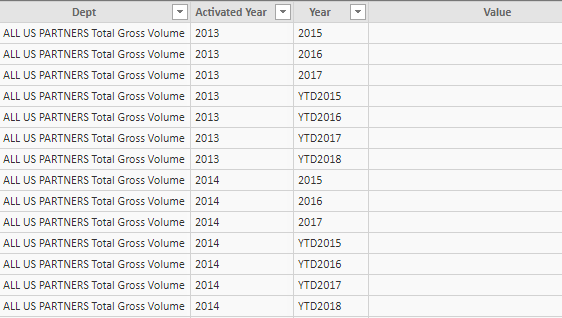
I need to create 2 different charts based on the following table (on with the year and one with YTD).
In the document it is from, year and YTD are mixed together ... Is there any way I can have a table with the year and another with YTD (and the dept, associated year and value attached to it) ?
And, if someone makes changes in the original document, is it going to refresh afterwards when neeeded ?
Thanks for the help,
Solved! Go to Solution.
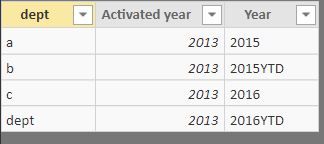
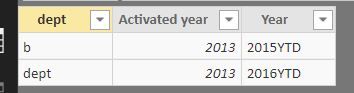
I will create two tables for this. Please check if this can meet your requirements. Thanks
TABLE2 = FILTER('Sheet27',SEARCH("YTD",'Sheet27'[Year],1,0)=0)
TABLE3 = FILTER('Sheet27',SEARCH("YTD",'Sheet27'[Year],1,0)>0)
Proud to be a Super User!
I will create two tables for this. Please check if this can meet your requirements. Thanks
TABLE2 = FILTER('Sheet27',SEARCH("YTD",'Sheet27'[Year],1,0)=0)
TABLE3 = FILTER('Sheet27',SEARCH("YTD",'Sheet27'[Year],1,0)>0)
Proud to be a Super User!
That's exactly what I need
Though I get this message when I try to split in 2 different tables :
Any idea why ?
Thanks a lot,
Are you creating a new table or new measure? This coding has to be used when you creating a new table.
Thanks
Proud to be a Super User!
Hi @NB3,
I think you are use these formula in calculated column, right? if this is a case, ryan_mayu's formula are calculated table formulas, please click on 'new table' icon to create new table to use his formulas.
Regards,
Xiaoxin Sheng
If you love stickers, then you will definitely want to check out our Community Sticker Challenge!
Check out the January 2026 Power BI update to learn about new features.
| User | Count |
|---|---|
| 64 | |
| 63 | |
| 49 | |
| 21 | |
| 18 |
| User | Count |
|---|---|
| 122 | |
| 120 | |
| 38 | |
| 36 | |
| 29 |