This time we’re going bigger than ever. Fabric, Power BI, SQL, AI and more. We're covering it all. You won't want to miss it.
Learn moreLevel up your Power BI skills this month - build one visual each week and tell better stories with data! Get started
Hey guys,
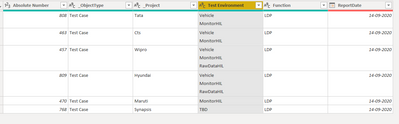
Looking for a solution for below Requirement , I have my table like as shown in below image
I have multiple values in Rows of Test Environment COlumn, i want to split those values into multiple Rows . Please help me to achieve this.
Thanks In Advance
Solved! Go to Solution.
Hi @techvidya
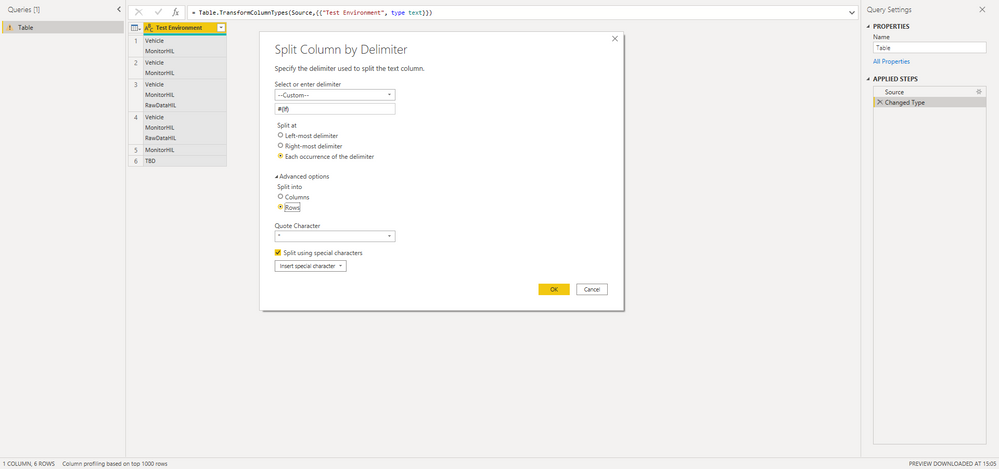
try the following transformation in Power Query:
With kind regards from the town where the legend of the 'Pied Piper of Hamelin' is at home
FrankAT (Proud to be a Datanaut)
Hi @techvidya
try the following transformation in Power Query:
With kind regards from the town where the legend of the 'Pied Piper of Hamelin' is at home
FrankAT (Proud to be a Datanaut)
@techvidya , You can split by delimiter. There is an option on right-click.
https://www.tutorialgateway.org/how-to-split-columns-in-power-bi/
I think you should be able to right-click and Split Column by Delimiter.
Power Query should recognise a custom character (like line feed).
Use the Advanced option and split to Rows.
Check out the April 2026 Power BI update to learn about new features.
Sign up to receive a private message when registration opens and key events begin.
If you have recently started exploring Fabric, we'd love to hear how it's going. Your feedback can help with product improvements.
| User | Count |
|---|---|
| 37 | |
| 28 | |
| 28 | |
| 20 | |
| 18 |
| User | Count |
|---|---|
| 66 | |
| 36 | |
| 29 | |
| 25 | |
| 24 |