Learn from the best! Meet the four finalists headed to the FINALS of the Power BI Dataviz World Championships! Register now
Hey guys,
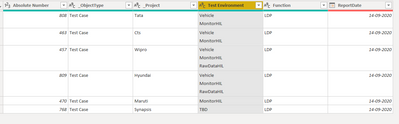
Looking for a solution for below Requirement , I have my table like as shown in below image
I have multiple values in Rows of Test Environment COlumn, i want to split those values into multiple Rows . Please help me to achieve this.
Thanks In Advance
Solved! Go to Solution.
Hi @techvidya
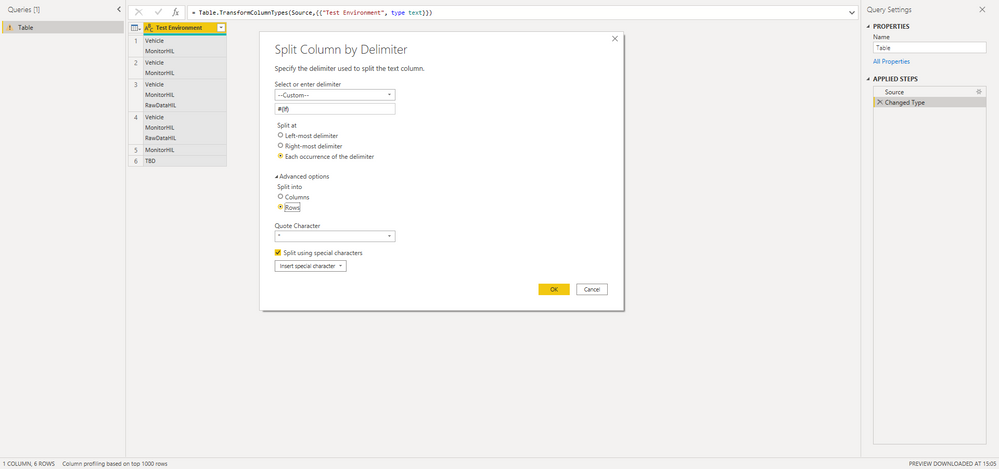
try the following transformation in Power Query:
With kind regards from the town where the legend of the 'Pied Piper of Hamelin' is at home
FrankAT (Proud to be a Datanaut)
Hi @techvidya
try the following transformation in Power Query:
With kind regards from the town where the legend of the 'Pied Piper of Hamelin' is at home
FrankAT (Proud to be a Datanaut)
@techvidya , You can split by delimiter. There is an option on right-click.
https://www.tutorialgateway.org/how-to-split-columns-in-power-bi/
I think you should be able to right-click and Split Column by Delimiter.
Power Query should recognise a custom character (like line feed).
Use the Advanced option and split to Rows.
| User | Count |
|---|---|
| 50 | |
| 36 | |
| 29 | |
| 18 | |
| 17 |
| User | Count |
|---|---|
| 66 | |
| 58 | |
| 40 | |
| 21 | |
| 20 |